Settlement
Which role does what here
| Role | What it can do here |
|---|---|
| Cashier and settlement officer | sees settlements, creates settlement drafts, finalizes a settlement |
| Site manager | sees settlements, creates settlement drafts, finalizes a settlement, reverses a settlement, creates a replacement settlement |
| Central manager | sees settlements, creates settlement drafts, finalizes a settlement, reverses a settlement, creates a replacement settlement |
| Accountant and back office | sees settlements |
| Auditor (read-only) | sees settlements |
What the screen is for
A settlement shows how the oil a producer is due from the production batches (the gross) becomes the mill fee and the net producer credit. The server does every calculation, in kilograms with 3 decimals and by truncation (extra decimals are cut off, never rounded). You do not need to calculate anything by hand.
A settlement starts as a Draft. When you finalize it, the oil is credited to the producer in their ledger. A finalized settlement never changes. If it is wrong, it is reversed (an inverse posting) and, if needed, a new replacement settlement is made.
Note: A settlement concerns the oil the producer owns (their ledger). It does not move oil from tank to tank. The physical stock in the tanks and the producer's ownership are two separate things.
Open the screen with the Settlement button in the row of screens.
The producer you selected on another screen (an intake, Oil withdrawals, Agreements) is already chosen in the list's producer filter; the producer you choose here follows to those screens.
Who sees it
- Cashier and settlement officer: sees, creates drafts, finalizes and discards them.
- Site manager and Central manager: everything the Cashier and settlement officer does, plus reversal, replacement and daily price entry. Only they finalize a replacement draft.
- Accountant and back office and Auditor (read-only): read only. They see "Read only: your role does not create or finalize settlements."
- Other roles see "You have no access to settlements at this site."
Tour: the settlement list
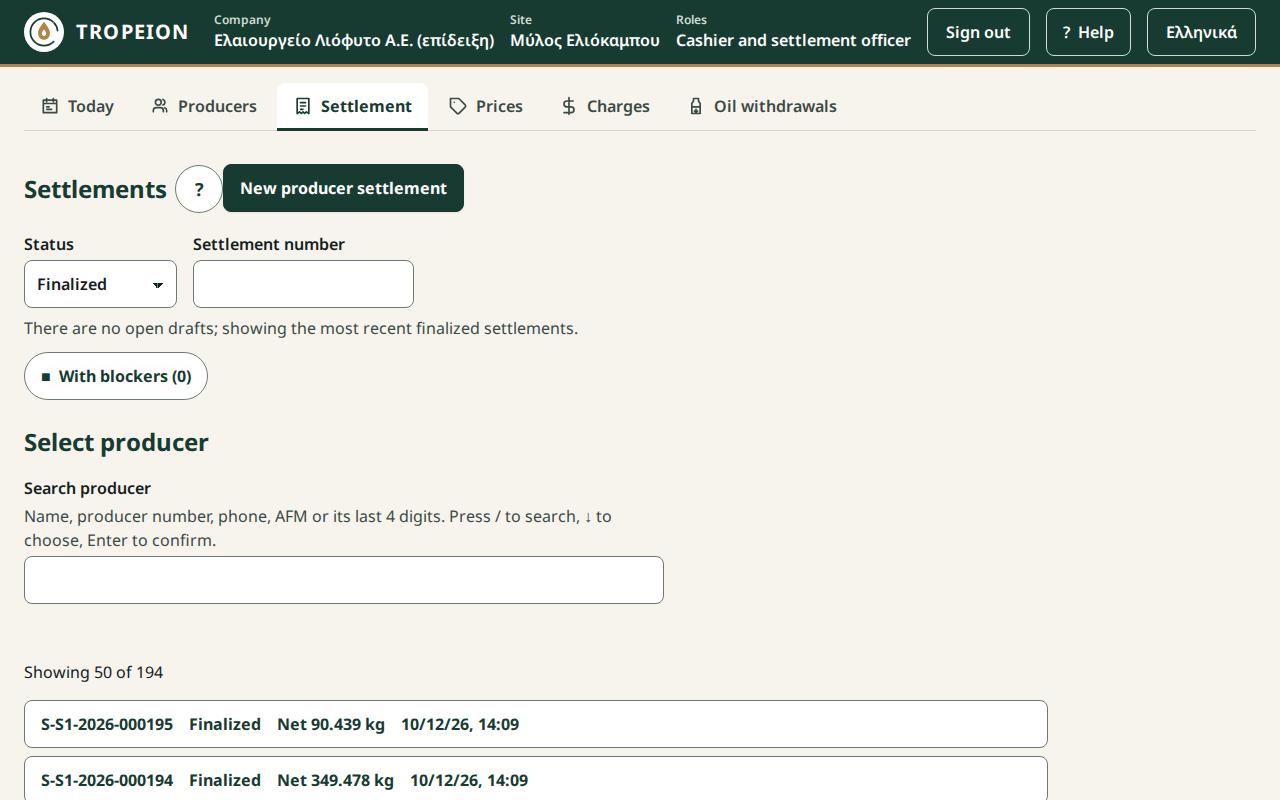
The title is Settlements. Below it:
- the New producer settlement button (Cashier and settlement officer, Site manager, Central manager);
- the list filters (see below);
- the list of the site's settlements. Each row shows the number (or "Draft" if not finalized yet), the status, the net and the finalization time. A draft that cannot be finalized yet also shows "■ Blockers: X".
Daily prices have their own screen, Prices, in the screen bar. See Daily prices.
The statuses are Draft, Finalized, Reversed and Discarded.
Filters and more rows
- Status: Open (drafts), Finalized, Reversed or All. The screen opens on Open (drafts), the settlements that need action. If there is no open draft, it opens on Finalized (the most recent first) and says "There are no open drafts; showing the most recent finalized settlements." You can always change the status. Discarded settlements appear only under All.
- Settlement number: type the number or part of it. A draft has no number yet, so this field does not find it.
- With blockers (X): a filter button. Pressed (✓) it shows only the drafts with blockers; press it again to see all. The number says how many drafts have blockers.
- Search producer: choose a producer to see only their settlements.
Above the list it says "Showing … of …": how many rows you see out of those matching the filters. The list shows 50 rows at a time. If more match, press More (… more) for the next 50. If none match, it says "No settlement matches the filters."
Tour: a new draft
- Press New producer settlement.
- Choose the producer with the producer search.
- The Gross allocation lines appear: one line per completed batch where the producer has oil not yet settled. Each shows the batch number, "Gross …" and whether it is Classified or Not classified yet.
- Tick the lines you want. The button reads "Create draft: N lines, gross X".
If the producer has nothing to settle, it says "This producer has no production to settle at this site."
Tour: a settlement
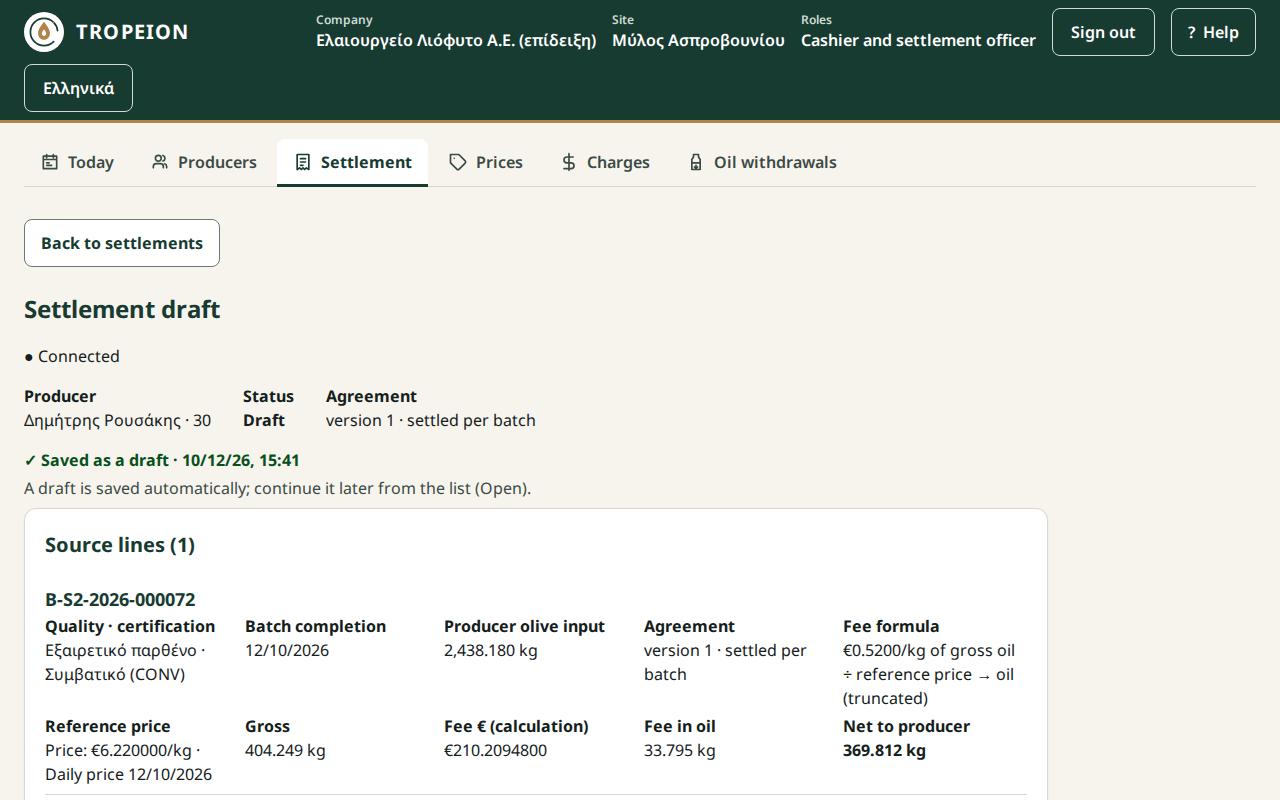
Header
Back to settlements, the title ("Settlement draft" or "Settlement …"), the connection, the Producer, the Status, the Finalized time and, for a replacement, which settlement it Replaces. Agreement shows the version and the settlement grouping, e.g. "version 2 · settled per batch", when every line has the same version; otherwise "X agreement versions (see each line)".
On a draft it says "✓ Saved as a draft · date time". A draft is saved automatically from the moment it is created; there is no save button. You can close the screen and continue later from the list (Open (drafts)). The time is the last time the screen received the draft from the server. A Skip to final review link takes you straight to the end.
Source lines
For each batch you see:
- Quality · certification, or "Not classified yet";
- Batch completion: the date;
- Producer olive input: the producer's olive kilograms in the batch;
- Agreement: the agreement version and the settlement grouping, e.g. "version 2 · settled per batch" or "consolidated settlement";
- Fee formula: either "N% of gross oil (truncated)", or "€N/kg of gross oil ÷ reference price → oil (truncated)";
- Reference price (monetary fee only): "Price: €…/kg · Daily price …", or "Latest prior price …" together with the "Requested date", or "No price";
- Gross, Fee € (calculation), Fee in oil and Net to producer.
If a line was recalculated, it is marked Changed with the reason (for example "the price was corrected", "a new quality decision", "the source changed").
If even one line uses the latest prior price, the warning "at least one line uses the latest prior price, not a price of the day" appears.
Additional charges
Draft only. Mandatory charges are ticked and locked. The cashier adds or removes the optional ones and types the Units of a per-unit charge. Press Save the charges and recalculate the draft; until then finalize waits. Every charge is deducted in oil at the daily price. See How charges enter the settlement.
Totals
The Totals in kg of oil and in € table: Producer's oil (gross), Mill fee, one row per charge (its settlement total, with the units where they apply), and Net to the producer, in kg of oil and in €, as the server calculated them (kg to 3 decimals, € to 2, truncated), whatever the agreement. Without a reference price the € column shows —. The printed statement shows the same table.
Blockers
While there are blockers, the red section "Blockers (N): finalizing is not allowed" lists them one by one, with the action that resolves each. See the messages below.
Ledger preview
Shows which postings finalization will make: Gross allocation clearing, Producer entitlement, Mill-owned oil, each as a Debit or Credit with its kilograms. While there are blockers, it says "No postings while blockers remain."
Final review
Shows the Calculation hash you confirm (a long code that identifies exactly this calculation), the Finalize and credit X to producer button and the Discard draft (the lines stay available) button.
After finalization
No value changes any more. The Site manager and the Central manager see the Correction section with the Reverse and replace button.
Every role that sees the settlement sees the Settlement statement section with the Print statement button. The statement is for the producer and is not a fiscal document. See How to print a settlement statement.
Buttons and actions, step by step
Create a draft
See How to create a settlement.
Finalize
- Open the draft.
- Check every source line and the totals.
- Resolve every blocker.
- Check the ledger preview.
- Press Finalize and credit X to producer.
- You see "Settlement … is finalized" and "X was credited to the producer. The ledger postings are recorded."
Finalizing locks the quality decisions of these batches. See How to finalize a settlement.
Discard a draft
- In Final review, press Discard draft (the lines stay available).
- The question "Discard the draft?" opens. Press Yes, discard the draft, or No, keep the draft (or Esc) to keep it.
- You return to the list. The draft becomes Discarded and its lines can go into a new draft.
Reverse and replace (Site manager, Central manager)
- Open the finalized settlement.
- Under Correction, press Reverse and replace.
- Read the four points: What you are doing, What will change, Who is affected, What cannot be undone.
- Write a Reason (required), up to 500 characters.
- Under Replacement intent choose "to be replaced by a new settlement" or "no replacement".
- Press Reverse: remove X from the producer and replace (or Reverse: remove X from the producer). You will be asked to sign in again; after signing in the same request is sent once.
- If you chose replacement, press Open the replacement draft. The lines of the old settlement are already ticked.
See How to reverse and replace a settlement.
Messages and what to do
Blockers
- "BLOCKER — A mandatory per-unit charge has no units.": Type the Units under Additional charges (0 allowed) and save.
- "BLOCKER — Batch … has no final quality classification.": The batch needs a quality decision. The Site manager and the Central manager see the link Classify batch …, which opens the Quality screen. The Cashier and settlement officer sees "Ask the quality officer to classify batch …". After the decision, open the settlement again.
- "BLOCKER — No price for batch …": A price is missing for exactly this site, quality and certification. The system never takes the price of another site, quality or certification. The Site manager or Central manager presses Enter a price: … and the price form opens right there, prefilled. The Cashier and settlement officer sees "Ask a manager to enter a price for …".
- "BLOCKER — The fee of batch … exceeds its gross oil…": The fee is never capped. The Site manager or Central manager corrects the agreement, or press New draft without batch ….
- "BLOCKER — The allocation of batch … was superseded." or "… is already settled elsewhere.": Press New draft without batch ….
- "BLOCKER — The agreement of batch … settles per batch.": The agreement wants one batch per settlement. Press New draft without batch … and make a separate settlement for it.
New draft without batch … discards the current draft and opens a new one with the remaining lines.
Other messages
- "The calculation changed since you saw it…": Meanwhile a price was corrected, a new quality decision came out or the source changed. Nothing was posted. The new calculation is loaded and the changed lines are marked Changed. Review them and press finalize again.
- "Someone else changed the settlement…": The current state is loaded; review it and try again.
- "A line was already settled in another settlement…": Nothing was posted. Make a draft without that line.
- "Replacement is not allowed…": The original was not reversed with replacement intent, or is already replaced.
- "A request awaits confirmation…": Press Resend (same request). It will not post twice. Or press Discard the waiting request.
- "The reversal needs a fresh sign-in…": Sign in; the same request is sent after it.
- "Offline: finalizing, reversing and price entry are disabled…": Wait for the connection. What you see may not be current.
Common mistakes
- Finalizing with an unclassified batch. You can put it in a draft, but it does not finalize until it is classified.
- Expecting to "edit". A finalized settlement is never corrected by changing values. The only correction is reversal and replacement. There is no undo.
- The wrong intent on reversal. If you choose "no replacement", you cannot later open a replacement draft from that settlement. The lines do become available again for a new ordinary settlement.
Related How-To
- How charges enter the settlement
- How to create a settlement
- How to finalize a settlement
- How to discard a settlement draft
- How to reverse and replace a settlement
- How to print a settlement statement
- Daily prices
How-To guides for this screen
- How charges enter the settlement
- How to create a settlement
- How to discard a settlement draft
- How to finalize a settlement
- How to print a settlement statement
- How to reverse and replace a settlement