Daily prices
Which role does what here
| Role | What it can do here |
|---|---|
| Quality officer | sees the prices |
| Cashier and settlement officer | sees the prices |
| Site manager | sees the prices, sets and corrects prices |
| Central manager | sees the prices, sets and corrects prices |
| Accountant and back office | sees the prices |
| Auditor (read-only) | sees the prices |
What it is for
The daily price is the price of oil in euros per kilogram, for one site, one quality class and one certification class, from an effective date. The settlement needs it on every line, whatever the fee type: it shows every figure in kg and in €, turns the additional charges into oil and, when the agreement has a monetary fee, turns the fee into oil. With a percentage in oil, the price does not change the fee kilograms.
How the settlement picks a price:
- It takes the price with exactly the same site, quality and certification as the batch. Never a price of another site, quality or certification.
- If there is no price for the requested day, it takes the latest prior price with the same key, and says so clearly: "Latest prior price …" and "Requested date: …".
- If there is no price at all with that key, the settlement has a blocker and cannot be finalized.
Prices have their own screen: press Prices in the screen bar. A price can also be entered inside a settlement draft, when there is a "No price" blocker, by pressing Enter a price: quality / certification (the form opens there with the quality and certification already chosen).
Who sees it
- Site manager and Central manager: see the prices and enter and correct them.
- Quality officer, Cashier and settlement officer, Accounting and Auditor: see the prices and the history, read only. The page says "Read only: the site manager and the central manager enter and correct prices."
- The other roles do not have the screen. If they open it, they see "You have no access to the prices of this site."
Tour of the page
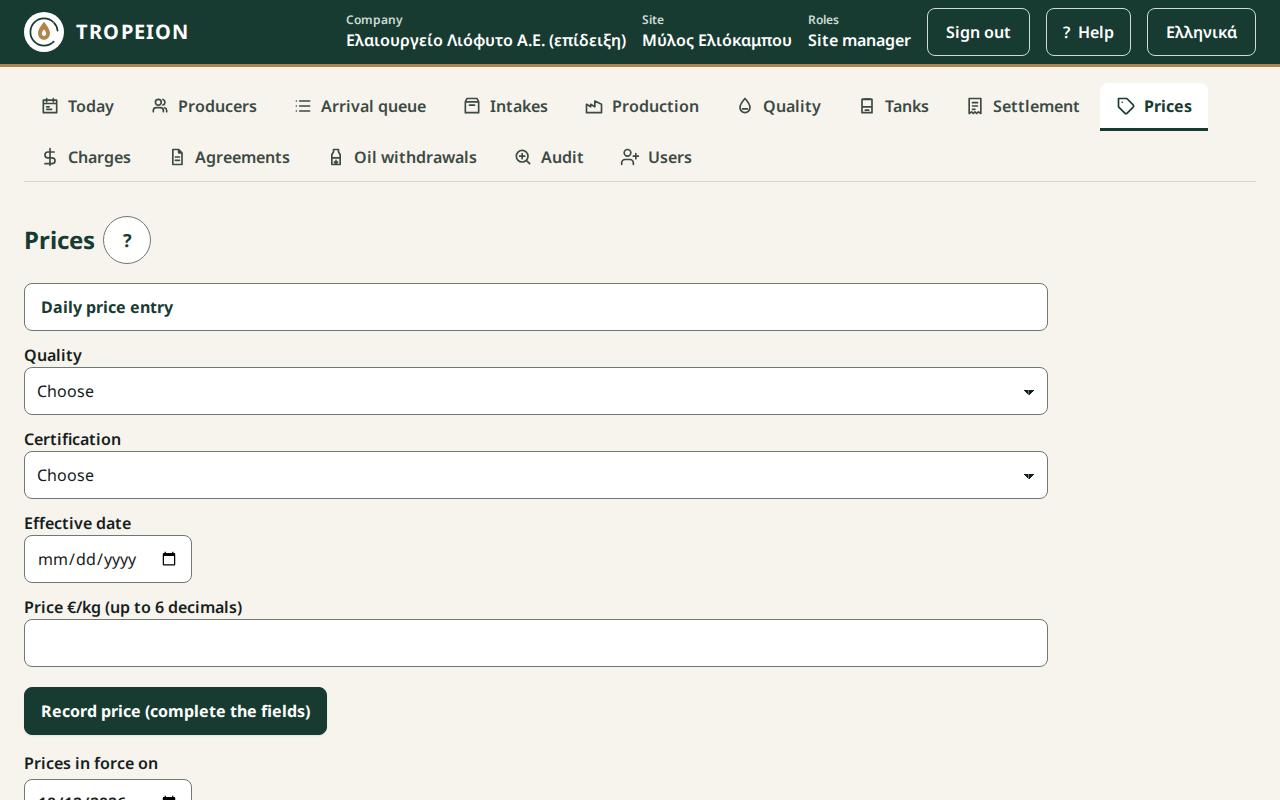
- Daily price entry (managers only): the form, open at the top of the page.
- Prices in force on: the date. It starts with today. Change it to see which price applied on another day.
- Current price per quality and certification, on …: one row for each combination of quality and certification. It shows "€…/kg · from …", the price and the day it applies from: the latest price with an effective date up to the chosen one, as the settlement picks it. If there is none, it says "▲ No price: every settlement with a batch of this class is blocked, whatever the fee type".
- History (X): every price with an effective date up to the chosen one, newest first. Each price shows quality, certification, Status ("Active" or "Superseded · by €…/kg"), for a correction "replaces €…/kg" and the Reason, and when it was Recorded.
In the form:
- Quality and Certification: the classes.
- Effective date: the day the price applies from.
- Price €/kg (up to 6 decimals): the price, greater than 0. Write for example
6.25or6.250000. - If a price already exists for exactly this key and date, an orange box appears: "Correction: the current price is €…/kg." and "Open drafts using this price will be recalculated and need a new confirmation.", with the field Correction reason (required).
- The button says what will happen: "Record price €…/kg for quality / certification from date", or, for a correction, "Correct price …: €old → €new/kg". While data is missing it says "Record price (fill in the fields)".
Buttons and actions, step by step
New price
- Press Prices.
- Choose Quality and Certification.
- Enter the Effective date.
- Write the Price €/kg (up to 6 decimals).
- Check the button text and press it.
- You see "Price €…/kg from … is recorded." The list and the history load again.
Correct a price
A price is never deleted or changed. A correction records a new price that supersedes the old one, with a reason. The old one stays in the history as "Superseded".
- In the form choose the same Quality, Certification and Effective date as the price you want to correct.
- The box "Correction: the current price is …" appears.
- Write the right price and the Correction reason (required).
- Press Correct price ….
Open drafts that used the old price are recalculated. Whoever goes to finalize them sees that the calculation changed and must confirm it again. Settlements already finalized do not change.
Messages and what to do
- "Choose a quality.", "Choose a certification.", "Enter an effective date.": Fill in the field.
- "Enter a price greater than 0, with up to 6 decimals.": The price cannot be 0 or have more than 6 decimals.
- "A correction needs a reason.": Write why the price changes.
- "A price exists for this key and date…": Someone entered a price meanwhile. The form loaded again and now shows the correction box; write a reason and press again.
- "A first price for this key takes no reason.": The first price of a key takes no reason.
- "A request awaits confirmation…": Press Resend (same request) or Discard the waiting request.
- "No price with an effective date up to the chosen one.": Choose a later date in Prices in force on.
- "The service is unavailable…": Press Load again.
Common mistakes
- Wrong certification. The price for organic does not apply to conventional, and vice versa. Enter a price for every combination you need; the list marks the missing ones with "No price".
- Wrong date. A price for tomorrow does not cover today's settlement. A price for yesterday covers today's only as the "latest prior price".
- A correction you did not intend. If the "Correction" box appears, a price already exists for that day. Check the date before you continue.