Public queue display
Which role does what here
| Role | What it can do here |
|---|---|
| Queue display (view only) | shows the waiting display |
What it is for
Waiting order is the screen producers see in the waiting room. It shows who is called now and who is waiting, without revealing personal details. It has no action buttons.
Who sees it
It opens only with a special account that has only the Queue display (view only) role. With this account no screen buttons appear and no action can be taken. The Intake operator, the Site manager and the Central manager work in the Arrival queue. If an account also has one of those roles, the normal Arrival queue opens, not the public display.
How to set it up
- On the waiting-room computer or TV, open TROPEION.
- Sign in with the account with the "Queue display (view only)" role that your administrator gave you.
- If the account has more than one site, choose the site in the "Work context" bar.
- If needed, switch the language with the button next to the header.
- Leave the screen open and visible. It updates itself about every one and a half seconds.
Caution: The display updates only while its browser tab is visible. Do not minimise it or open another tab over it.
Screen tour
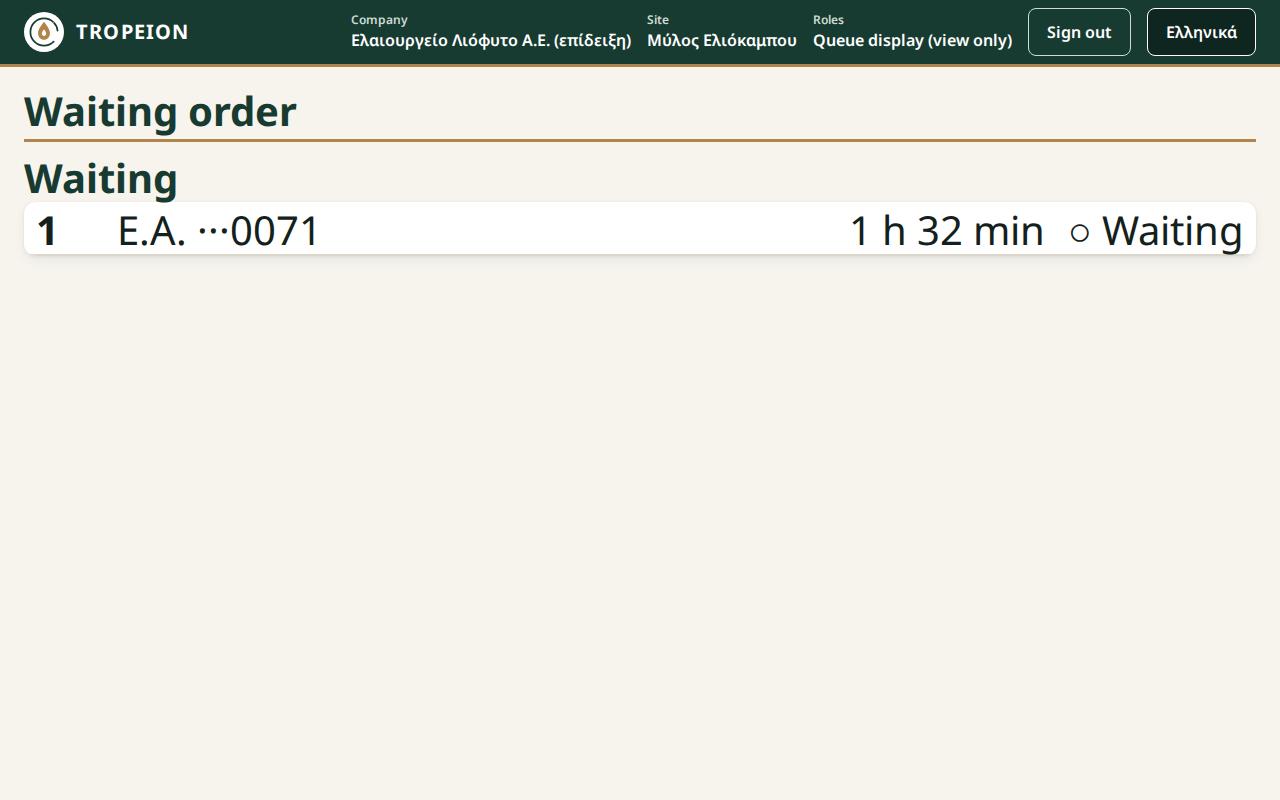
- Now called: producers called to the scale, highlighted, marked "▶ Called".
- Waiting: producers waiting, in order, marked "○ Waiting".
Each row has:
- the queue position,
- the initials of the name,
- the last 4 digits of the AFM (tax id), for example "···1234", so everyone can recognise themselves,
- the waiting time, for example "8 min",
- the state.
The display shows up to 10 rows in total: first those called, then the head of the queue. If more are waiting, it says "+… more waiting", "+… or more waiting" or "More are waiting".
The display never shows a full name, a full AFM, kilograms or reasons.
Messages and what to do
- "Loading…": wait.
- "No one is waiting right now.": the queue is empty.
- "No connection: the order may be out of date.": check the network of the display computer. "Last update" is shown next to it. The display resumes by itself when the connection returns.
- "The order is not updating right now.": the service is not answering. The display retries by itself.
- "This account cannot show this site's queue display.": the account has no role at this site. Check the site in the "Work context" bar or tell your administrator. The display does not retry by itself. After the fix, reload the page.
- "The display session has expired. Sign in again.": sign in again with the display account.
Common mistakes
- Opening the waiting-room display with your personal account. The room then sees the Arrival queue, with names. Always use the account with the "Queue display (view only)" role.
- Leaving the display on the wrong site.
- Hiding the tab, so the display stops updating.