Audit
Which role does what here
| Role | What it can do here |
|---|---|
| Site manager | sees the action history |
| Central manager | sees the action history |
| Accountant and back office | sees the action history |
| Auditor (read-only) | sees the action history |
What it is for
The Audit screen shows who did what and when: every action recorded in the system (for example a settlement finalized, a weight corrected, a tank counted), with the user, the subject and the site. The screen is read-only.
The screen opens from the Audit button in the row of screens.
Who sees it
- Auditor (read-only), Accountant and back office, Central manager: the whole company. They can narrow it down with the Site filter.
- Site manager: only the selected site. They do not see other sites' actions or company-level actions.
- Other roles do not see the button. If they open the screen they see "You have no access to the audit."
Tour: the table
Entries are shown newest first. Each row has:
- When: date and time.
- Who: the user's name, or "System" for an automatic action.
- Action: for example "Settlement finalized".
- Subject: its type and number, for example "Settlement ΕΚ-2026-0007". A subject without a number shows its type only, for example "Withdrawal request" for the oil withdrawal actions. When the subject has a screen you can open, the number is a link.
- Site: the site, or "Whole company" for a company-level action.
- Outcome: "Recorded". The audit records only completed actions.
Press More for older entries.
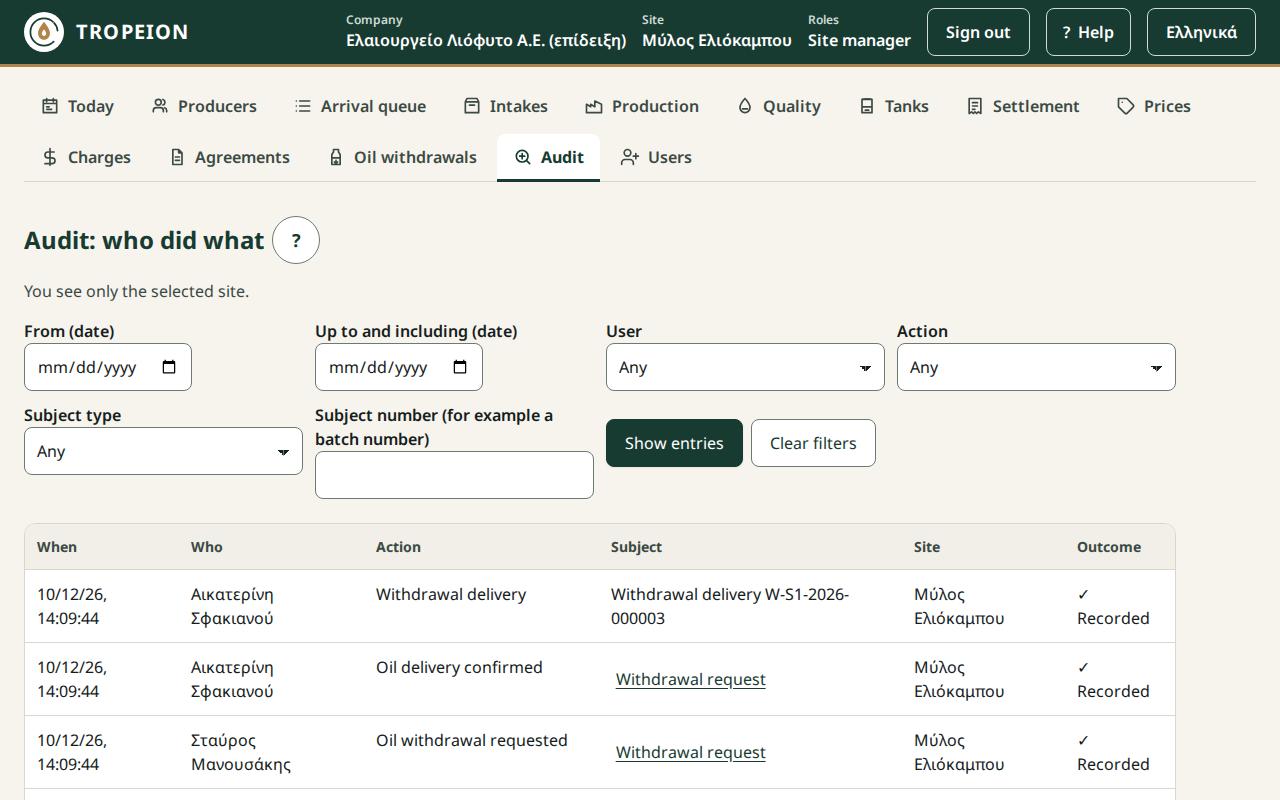
The filters
- From (date) and Up to and including (date): days count in the site's time.
- User: the users already seen in the entries.
- Action: one action. The list holds every action the system records, including the oil withdrawals and company onboarding.
- Subject type and Subject number: to search by number (for example a batch number) also choose the type.
- Site: only for those who see the whole company.
Press Show entries. Clear filters shows all entries again.
Messages
- "No entries for these filters.": change or clear the filters.
- "The entries could not be loaded. Check the filters and try again.": press Reload.
- "The "up to" date cannot be before the "from" date.": correct the range.