Oil withdrawals
Which role does what here
| Role | What it can do here |
|---|---|
| Warehouse and tank operator | sees oil withdrawals, delivers oil from tanks |
| Cashier and settlement officer | sees oil withdrawals, records and closes withdrawal requests, delivers oil from tanks |
| Site manager | sees oil withdrawals, records and closes withdrawal requests, delivers oil from tanks, reverses a delivery |
| Central manager | sees oil withdrawals, records and closes withdrawal requests, delivers oil from tanks, reverses a delivery |
| Accountant and back office | sees oil withdrawals |
| Auditor (read-only) | sees oil withdrawals |
What it is for
Here the producer collects their oil. First there is a withdrawal request: which producer, which oil class and how many kg. Then one or more deliveries are made from the tanks, until all the kg are delivered or the request is closed.
- A request reserves nothing. The kg are checked at the moment of delivery.
- A delivery lowers, together and by the same kg, the producer balance (the ledger) and the tank stock.
- Only settled oil at this site can be withdrawn. See Settlement.
- kg are entered with up to 3 decimals and are never rounded.
Note: A withdrawal and its paper are not a tax document. Delivery notes, myDATA and e-signature are not done in this application.
The screen opens from the Oil withdrawals button in the row of screens.
The producer you selected on another screen (Settlement, Agreements, an intake) is already chosen in the list's producer filter, and the tank you opened in Tanks is marked "Selected tank" in a delivery.
Who sees it
- Cashier and settlement officer: creates requests, records deliveries, closes requests and prints papers.
- Warehouse and tank operator: records deliveries only on open requests and prints papers. Does not create, close or reverse.
- Site manager and Central manager: all of the above, plus delivery reversal, with a reason and a new sign-in.
- Accountant and back office and Auditor (read-only): read only.
- Other roles see "You have no access to the oil withdrawals of this site."
Hidden buttons are not the only protection: the service checks every action separately.
The request list
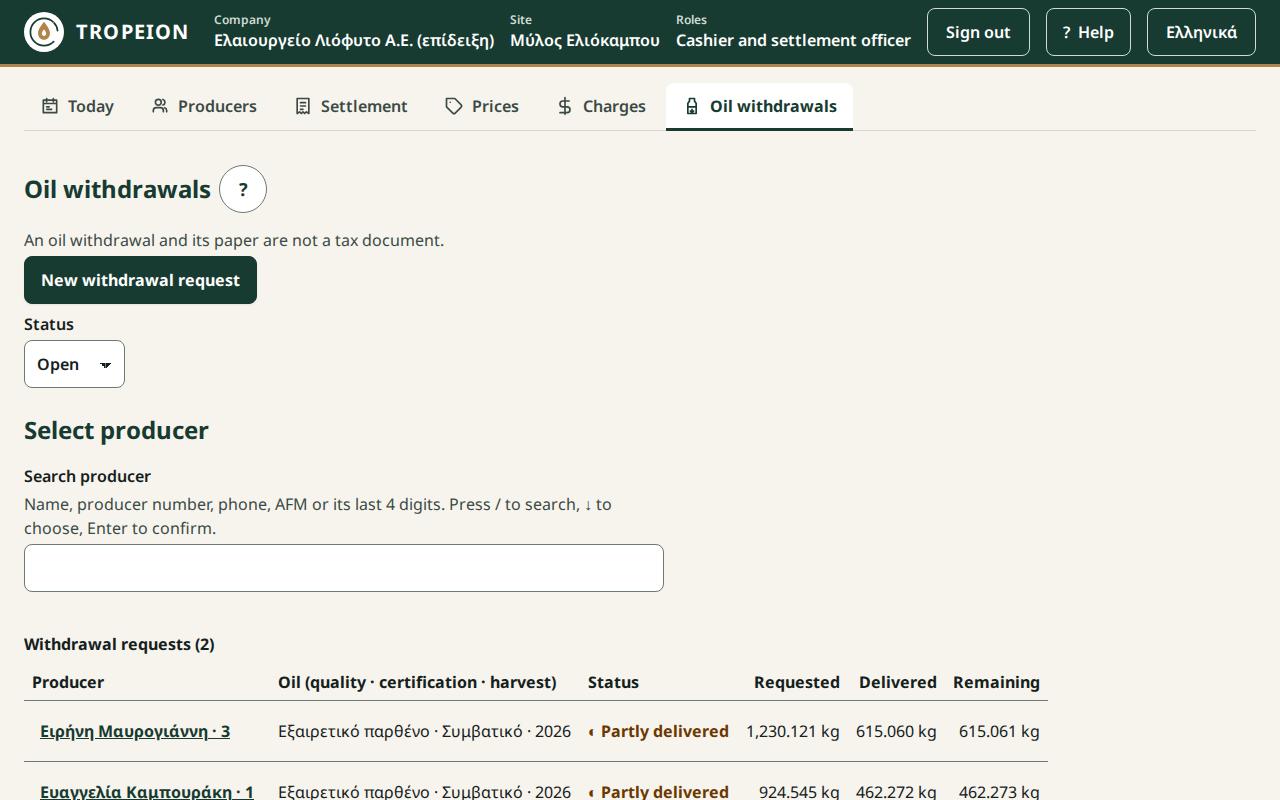
The table shows for each request: Producer, Oil (quality · certification · harvest), Status, Requested, Delivered and Remaining.
The statuses:
- ○ Open: nothing delivered yet.
- ◐ Partly delivered: open, with some kg already delivered.
- ✓ Fulfilled: all the kg were delivered.
- ✕ Cancelled: closed with a reason before everything was delivered.
Filter and search
- Status: Open (the default), Fulfilled, Cancelled or All. If there is no open request, the screen opens on Fulfilled and says "There are no open requests; showing the most recent fulfilled ones."
- Producer search: pick a producer to see only their requests.
- The list loads 50 requests at a time. Press More requests for the next ones.
Press the producer's name to open the request.
New request
- Press New withdrawal request.
- Find the producer with the search.
- The producer's settled oil appears: one row per class, with the balance from the ledger.
- Pick a class. A request covers one class; for two classes make two requests.
- Enter the kg the producer asks for and, if you like, a note.
- Press Create request: … kg ….
If the kg are above the balance you see a warning. The request is made, but each delivery is limited to the balance at that moment. If the producer has no settled oil you see "The producer has no settled oil at this site."
Deliver oil
On an open request, the Deliver oil section shows only the site's tanks holding stock of the same class, with their stock.
- Enter kg in one or more tanks. Leave the unused ones empty.
- Check the Total against the open kg.
- If the total is below the open kg, tick Partial delivery: … stay open on the same request. The remainder stays open on the same request.
- Press Confirm delivery of … from … tank(s).
The screen does not send the delivery when a tank's kg exceed its stock, when the total exceeds the open kg or the producer balance, or when the partial-delivery confirmation is missing. The service checks them again when it records the delivery.
Close
An open request is closed with Close the request…, a reason and Close the request with … open. The open kg are not delivered; the producer balance does not change, because nothing was reserved. A new delivery needs a new request.
Delivery reversal
A delivery is never edited. If it was wrong, the Site manager or the Central manager reverses it and a new correct delivery is recorded. The kg return to the producer balance and to the same tanks. A reason and a new sign-in are needed. See How to reverse a delivery.
The withdrawal note
Each delivery has its own Olive oil withdrawal note for signing. See How to print the delivery paper.
Messages
- "Someone else changed the withdrawal." The current state is loaded. What you typed is kept; check and press again.
- "The tank does not hold that much oil of this class." Lower the kg or split them over another tank.
- "The kg are below the open kg: confirm the partial delivery." Tick the partial delivery.
- "The kg are not valid." A positive number with up to 3 decimals.
- "The request was sent but not confirmed." Press Send again (same request); it is not recorded twice.
- Offline: the actions are disabled until the connection is back.
How-To guides for this screen
- How to give a producer their oil (withdrawal)
- How to print the delivery paper
- How to reverse a delivery