Screen: Oil withdrawals
How to print the delivery paper
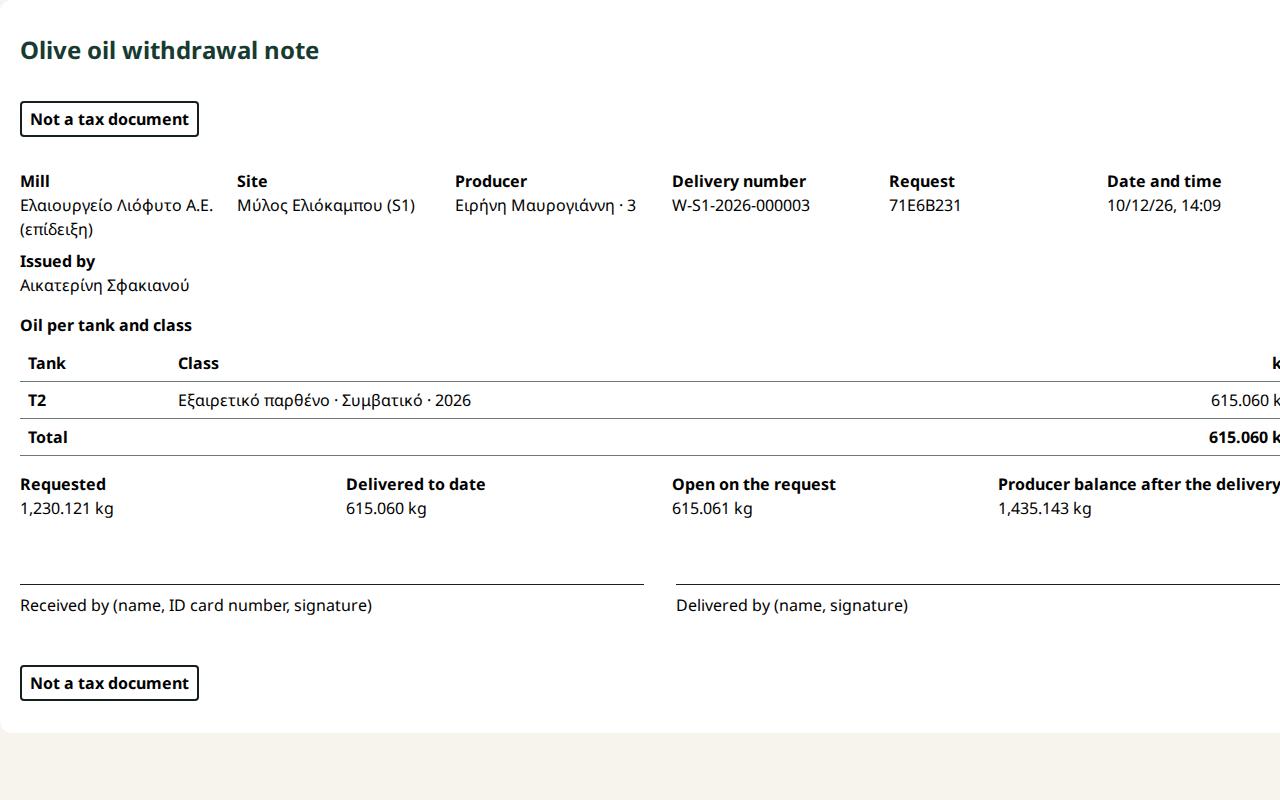
Each delivery has an Olive oil withdrawal note that the producer and the mill sign. It is not a tax document and says so at the top and the bottom.
Steps
- Open the request from the Oil withdrawals list.
- On the delivery press Paper W-… for printing.
- The paper shows: the mill and the site; the producer and their number (no tax id); the delivery number and the request; the date and time; the tank, class and kg; the total; the requested, delivered to date, open and the producer balance after the delivery; the signature lines "Delivered by (name, signature)" and "Received by (name, ID card number, signature)", so a person collecting for the producer can sign.
- Press Print paper W-…. Only the paper goes on paper.
- Press Back to the withdrawal.
What if…
- …it says the producer details did not load. Check the connection and press again.
- …the delivery was reversed. The paper prints with VOID and the reversal time. The reason is not printed.
- …the producer asks for a delivery note or an invoice. The paper does not replace them; they are issued outside the application.