Intakes
Which role does what here
| Role | What it can do here |
|---|---|
| Intake operator | sees intakes and olive lots, records intakes, corrections and splits |
| Site manager | sees intakes and olive lots, records intakes, corrections and splits, reverses a split |
| Central manager | sees intakes and olive lots, records intakes, corrections and splits, reverses a split |
| Accountant and back office | sees intakes and olive lots |
| Auditor (read-only) | sees intakes and olive lots |
What it is for
The Intakes screen lists the olive intakes of the site you work at, newest first. Here you find an intake by date or search and open it in Fast intake.
Who sees it
- Intake operator, Site manager, Central manager: see the list and open the intake with all its actions.
- Accountant and back office and Auditor (read-only): see the list and open the intake read-only. This is their way into the intakes.
You only see the intakes of the site selected in the "Work context" bar.
Screen tour
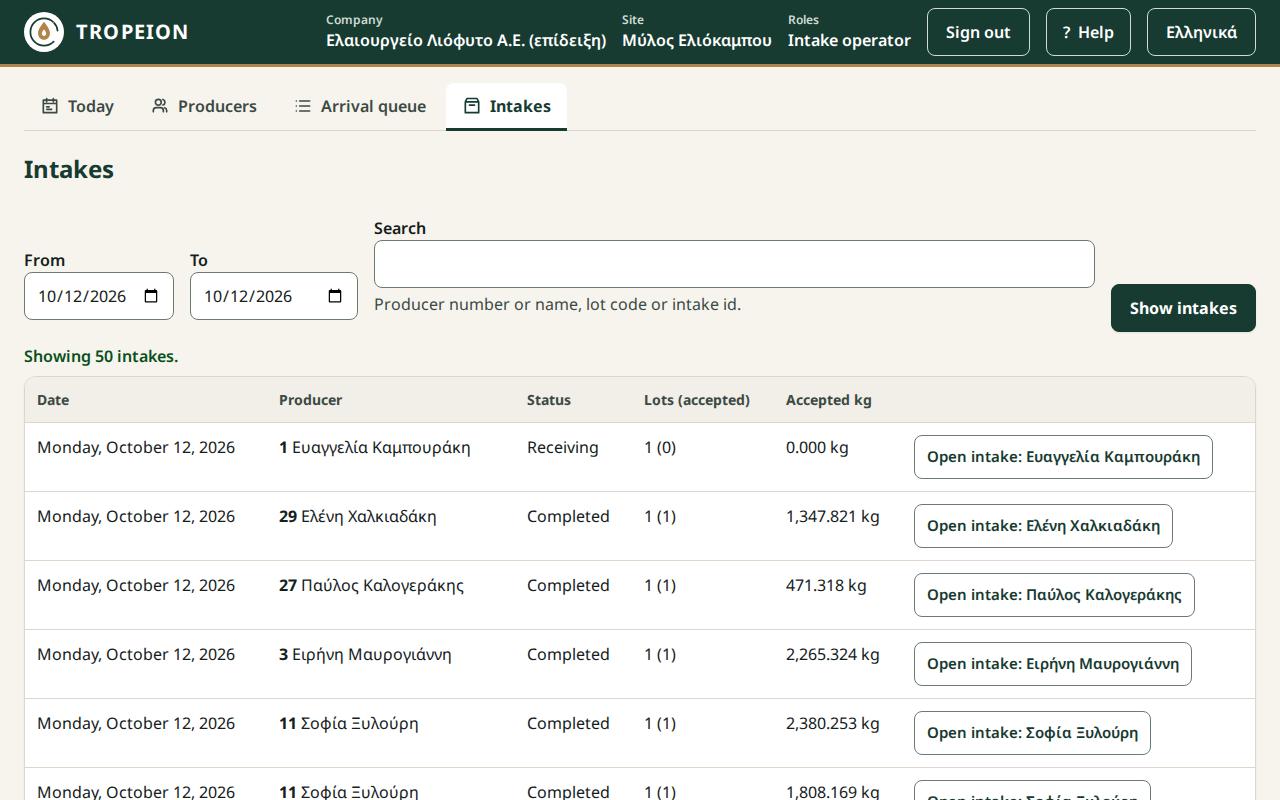
- From and To: the intake dates. Both default to today.
- Search: producer number or name, lot code (the short one too) or intake id. Accents and capitals do not matter.
- Show intakes: applies the filters. Enter in any field does the same.
- The table has Date, Producer (number and name), Status, Lots (accepted) and Accepted kg, with the kg unit. Kilograms are shown exactly as recorded, with up to 3 decimals.
- Open intake: …: opens the intake of that row.
- More: loads the next 50 intakes below the ones shown.
Steps
- Press Intakes in the screen buttons.
- Change From and To if needed.
- Type something in Search if you want.
- Press Show intakes.
- Press Open intake: … on the row you want.
- To return, press Back to the intakes. Your filters are kept.
Messages and what to do
- "No intakes found for these dates and search.": widen the dates or change the search.
- "The “From” date is after the “To” date.": correct the dates. The button stays disabled until then.
- "No connection: the intakes did not load.": press Reload intakes when the connection returns. Your filters are kept.
- "The intakes are temporarily unavailable.": press Reload intakes. If a "Reference" appears, note it for your administrator.
- "You have no access to this site's intakes.": check that you are at the right site.
- "Your session has expired. Sign in again.": sign in again.