Quality
Which role does what here
| Role | What it can do here |
|---|---|
| Production operator | sees quality, records a line cleaning |
| Quality officer | sees quality, finalizes a classification, records a line cleaning |
| Site manager | sees quality |
| Central manager | sees quality |
| Accountant and back office | sees quality |
| Auditor (read-only) | sees quality |
What the screen is for
On the Quality screen you classify the oil of each completed production batch: you enter the lab measurements (for example acidity), choose the quality class and the certification, and finalize the decision. The line cleaning is also recorded here; a batch needs it to keep the organic (or another higher) certification.
The quality decision is needed for settlement: a batch without a final classification blocks the finalization of the producer's settlement.
Open the screen with the Quality button in the row of screens.
If you come from Production with a batch open, the same batch opens here when it is in the pending list; otherwise you see the list as usual.
Who sees it
- Quality officer: sees everything, enters measurements, finalizes the classification and records line cleanings.
- Production operator: sees the screen and records line cleanings. Does not finalize a classification.
- Site manager, Central manager, Accountant and back office, Auditor (read-only): read only. They see "Read only: only the quality officer finalizes the classification."
- Other roles see "You have no access to quality at this site."
Tour: the pending list
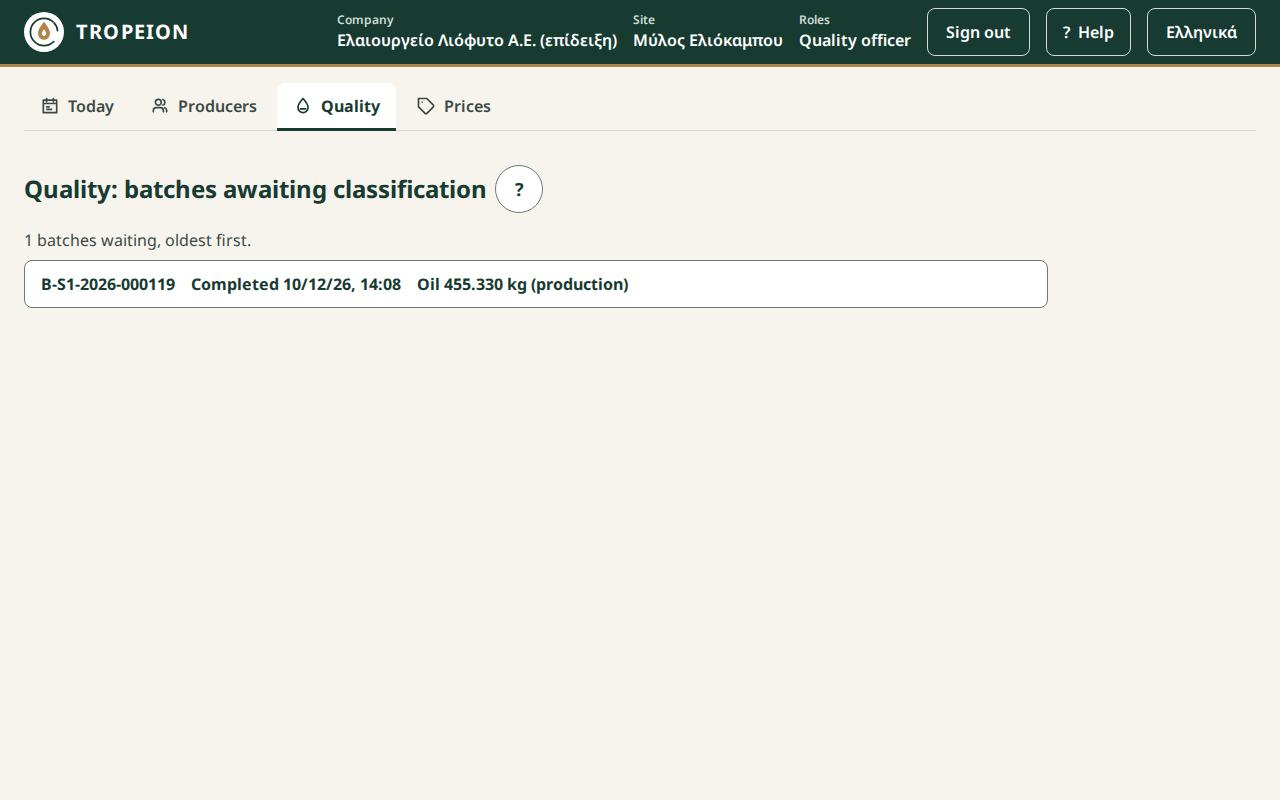
The title is Quality: batches awaiting classification. The list shows the completed batches that produced oil and have no quality decision yet, oldest first. Each row shows the batch number, when it was completed and its oil. Press a row to open the classification.
If none is waiting, it says "No completed batch is awaiting classification."
Note: A batch completed with 0 kg of oil does not appear here, because there is no oil to classify. Once a batch has a decision, it leaves the list.
Tour: classifying a batch
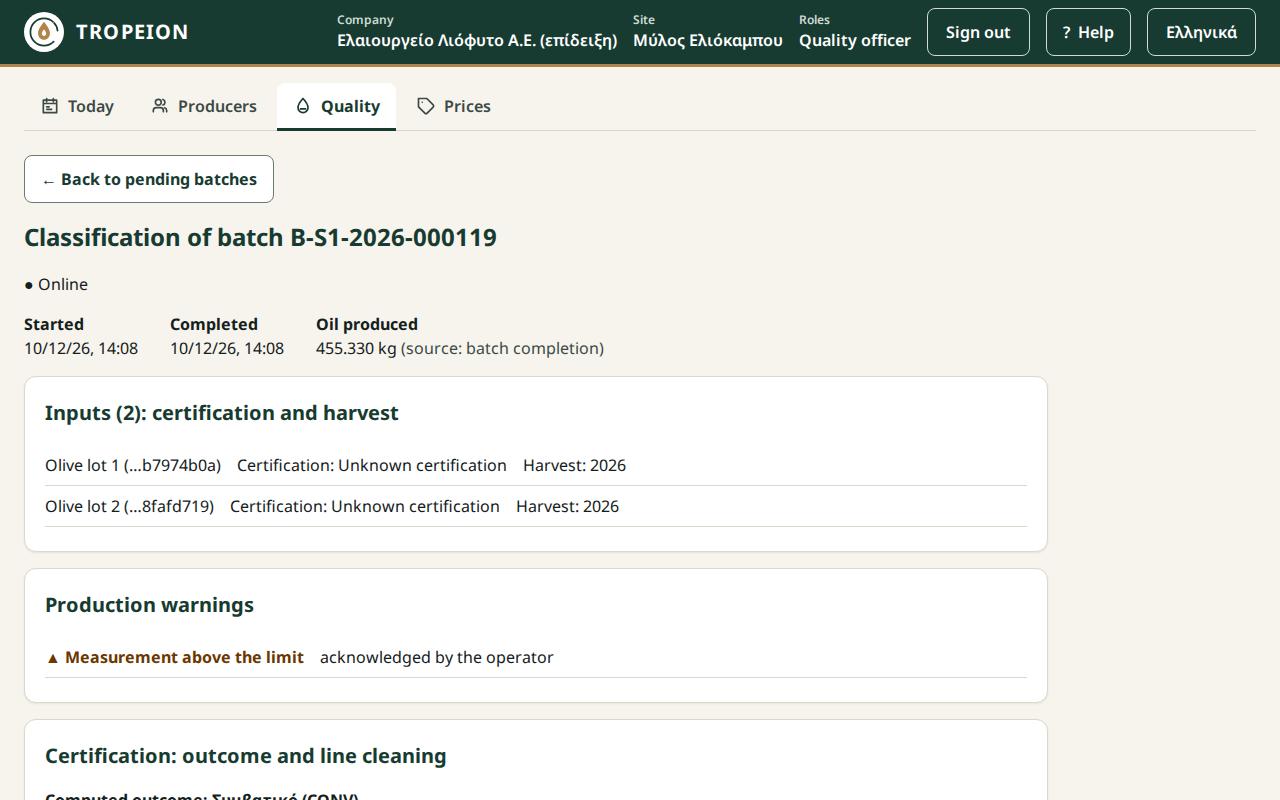
At the top are the ← Back to pending batches button and the title "Classification of batch …". Next to it you see whether you are Online or Offline. Then come the batch's Started, Completed and Oil produced.
Inputs
The section "Inputs (N): certification and harvest" lists each olive lot of the batch, with its certification and its harvest.
Production warnings
Shows the warnings recorded during production (a measurement out of range, a yield outside the range, a certification mix) and whether the operator acknowledged them.
Certification: outcome and line cleaning
- Computed outcome: the certification the system derives from the inputs. If every input has the same certification, that is the outcome. If they differ or one is unknown, the batch is conventional. A certification mix is a fact and cannot be overridden.
- Line cleaning (must cover the start): the list of cleanings of the line. Each says Valid at the start or Does not cover the start.
- If no cleaning covered the start, the amber warning Warning: line cleaning missing appears.
- + Record a line cleaning opens the cleaning form (for Quality and Production).
Quality decision
The form "Quality decision (#1)" appears only for Quality. It has:
- Lab measurements: one field per measurement type, marked "(required)" or "(optional)". Decimals with a comma or a period.
- Lab evidence reference (optional): a report number or reference. No file is uploaded.
- Quality class (manual choice): the system does not suggest a class; you choose it.
- Batch certification: only the computed outcome or conventional, never higher.
- Override reason (required): appears only when the line cleaning is missing and you keep the higher certification.
- A preview line: "Outcome: the batch will be classified …".
- The Finalize classification: class · certification button.
Decision history
Shows every decision of the batch, newest first, with the measurements, the override and the evidence. The latest is marked Current and the older ones Superseded. No decision is ever deleted.
Buttons and actions, step by step
Finalize a classification (Quality)
- Open the batch from the list.
- Check the inputs, the warnings and the computed outcome.
- Enter the lab measurements. The required ones must be filled in.
- If you want, enter the Lab evidence reference (optional).
- Choose the Quality class (manual choice).
- Choose the Batch certification.
- If Override reason (required) appears, write why you keep the certification without a valid cleaning, or choose conventional.
- Read the "Outcome: …" line and press Finalize classification: ….
- A green receipt appears: "Classification finalized · decision #1".
If you press the button with something missing, the list "Cannot finalize yet:" shows what is missing.
Correct a decision (Quality)
A decision does not change; it is corrected by a new decision that replaces it.
- After finalizing, on the same screen, the form becomes "Correct the quality decision (new decision #2)".
- Fill in the measurements, class and certification again.
- Press Finalize correction: ….
- In the history, the new decision becomes Current and the previous one Superseded.
Note: Once you leave the screen, a batch with a decision no longer appears in the pending list. If a correction is needed later, talk to the Site manager.
Caution: As soon as a settlement is finalized with this batch, the decision is locked. The screen shows Locked by settlement and the decision can no longer be corrected here. Reclassification is not available yet.
Record a line cleaning (Quality, Production)
- Press + Record a line cleaning.
- In Cleaning completed (site time) enter the date and time. It cannot be in the future.
- In Valid until (site time) enter when it expires. It must be after the completion.
- In Evidence (form number or reference) enter the form number.
- Press Record the line cleaning.
- You see "The cleaning is recorded; the certification outcome was recalculated." If the cleaning covers the start, the cleaning warning goes away.
The cleaning belongs to the production line, not only to this batch.
Messages and what to do
- "Another user finalized a classification for this batch in the meantime.": The screen shows what is there now ("Now on the server: decision #…"). What you typed is kept. Review and, if needed, finalize again.
- "A settlement locked the batch before your decision arrived…": The decision was not recorded. The batch is now locked.
- "The override no longer matches the cleaning state…": Someone recorded a cleaning meanwhile. The data was refreshed; review the certification and finalize again.
- "The inputs have different harvests; the batch cannot be classified.": The batch has olives from different harvests. Talk to the Site manager.
- "A required measurement (acidity) is missing.": Fill in the measurement.
- "The finalization was sent but not confirmed…" or "The cleaning record was sent but not confirmed…": Press Resend (same request). It will not be recorded twice. If you do not want it, press Discard the unsent request.
- "Offline: finalizing and recording a cleaning are disabled…": Wait for the connection. Everything you typed is kept.
- "The service did not answer…" or "Too many requests…": Wait a little and press Resend (same request).
Common mistakes
- Organic without a cleaning. If no cleaning covers the start, record the cleaning (if it was done) before you finalize. An override with a reason stays in the history for good.
- Wrong cleaning time. Times are site time. The cleaning must be completed before the batch started and still be valid then.
- Waiting for a suggested class. The system does not suggest a quality class; choose it yourself.
Related How-To
- How to enter lab measurements
- How to finalize or correct a quality decision
- How to record a line cleaning
- Settlement
How-To guides for this screen
- How to finalize or correct a quality decision
- How to record a line cleaning
- How to enter lab measurements