Today
Which role does what here
| Role | What it can do here |
|---|---|
| Intake operator | sees intakes and olive lots, sees the queue |
| Production operator | sees production, sees the tanks, sees quality |
| Quality officer | sees quality |
| Warehouse and tank operator | sees the tanks |
| Cashier and settlement officer | sees settlements |
| Site manager | sees the action history, sees intakes and olive lots, sees production, sees the tanks, sees quality, sees the queue, sees settlements |
| Central manager | sees the action history, sees intakes and olive lots, sees production, sees the tanks, sees quality, sees the queue, sees settlements |
| Accountant and back office | sees the action history, sees intakes and olive lots, sees production, sees the tanks, sees quality, sees settlements |
| Auditor (read-only) | sees the action history, sees intakes and olive lots, sees production, sees the tanks, sees quality, sees settlements |
What it is for
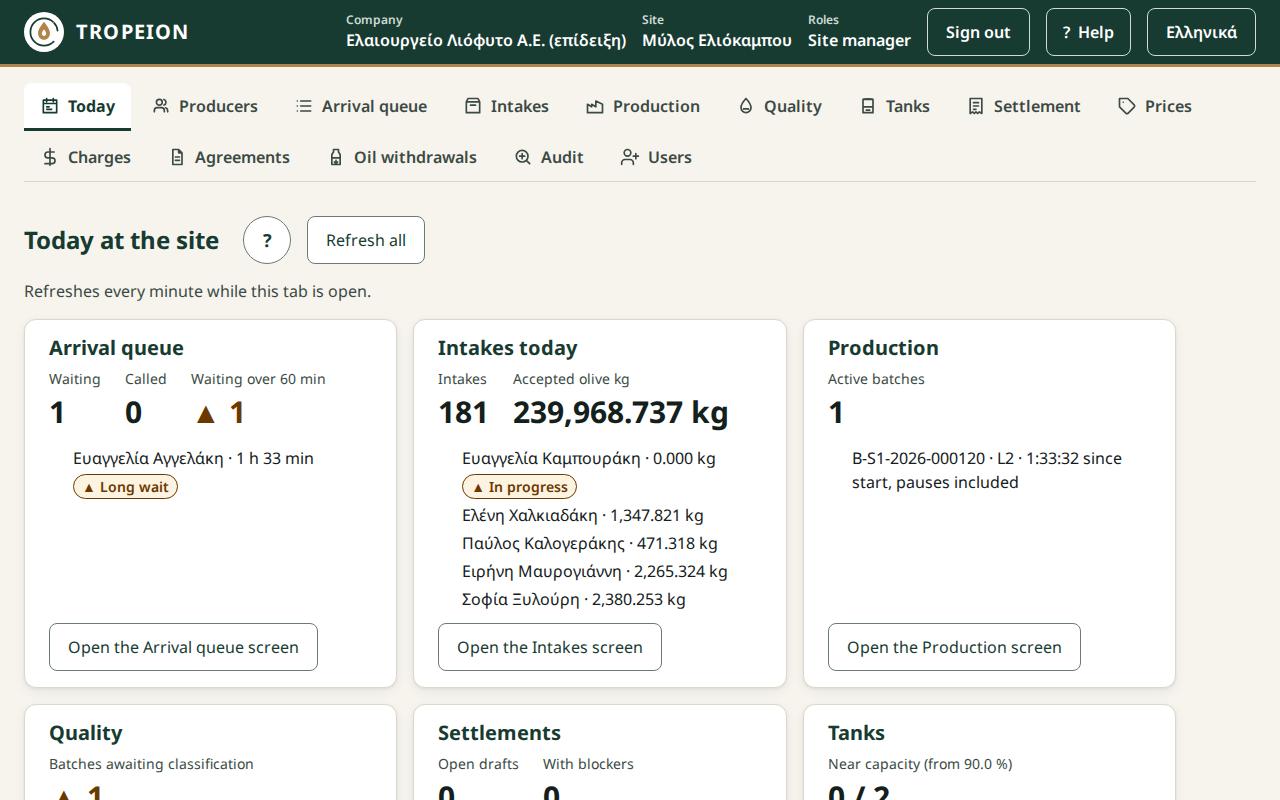
The Today screen shows at a glance what is happening now at the site you selected. Each tile has a number, a short list and a button that opens the related screen. All quantities are in kilograms (kg), as on the other screens.
The screen opens from the Today button, the first in the row of screens. It is the first screen for the Site manager, the Central manager, the Accountant and back office and the Auditor (read-only).
Who sees it
Each role sees only the tiles of the screens it can open:
- Arrival queue: those who see the queue.
- Intakes today, Production, Quality, Settlements, Tanks: those who see the matching screen.
- Latest actions: those who see the Audit.
The queue display and the platform operator do not see it.
Tour: the tiles
- Arrival queue: how many are waiting, how many were called and how many have waited longer than the site's limit (usually 60 minutes), with the names and waits of the first ones.
- Intakes today: how many intakes took place today and the accepted olive kg. Cancelled intakes do not count.
- Production: the active batches (and the paused ones), with the line and the time since start. That time includes the pauses; the production console shows the net active time.
- Quality: the batches awaiting classification.
- Settlements: the open drafts and how many have blockers.
- Tanks: the tanks near capacity, with their fill percentage.
- Latest actions: the last 5 actions of the Audit.
A ▲ mark shows something that needs attention.
Refreshing
The figures refresh every minute while the tab is open. While the tab is hidden the refresh stops, and it runs at once when you return. The Refresh all button loads them now.
Messages
Each tile loads on its own. If one fails, the others stay.
- "The figures could not be loaded. Try again.": press Reload on the tile.
- "Showing the figures from …": the last refresh failed and you see the figures of the time shown.
- "Partial view: only the first results are counted.": there are too many results. Open the screen for the full list.
- "You have no access to these figures at this site.": the service refused the read.