Roles: who does what
What this chapter is for
This chapter covers the 11 roles in TROPEION. For each role it explains who it is for, which screens it sees, what it can do and what it can only view, which actions ask for a new sign-in, and who does the things the role cannot do. After the roles you will find guidance on sharing roles in a small mill, and a summary table.
Role and screen names are written exactly as they appear in the application.
What a role is
- A role decides what you see and what you can do. Your role decides which screen buttons appear and which actions are allowed. The service checks every action again. If an action is not allowed, nothing changes.
- One user can hold many roles. One person gets as many roles as they need. They see the screens of all their roles together, and can do anything that any one of those roles allows. No role takes away a permission that another role gives.
- Site roles. Intake operator, Production operator, Quality officer, Warehouse and tank operator, Cashier and settlement officer, Site manager and Queue display (view only). They apply only at the site where they were given. A user can hold different roles at each site.
- Company roles. Central manager, Accountant and back office, and Auditor (read-only). They apply at every site of the company.
- The Platform operator (tenant onboarding) belongs to no olive mill. Only TROPEION's own staff hold this role.
- One site at a time. Almost every screen shows and changes only the site chosen in the "Work context" bar. The roles that count are your roles at that site, together with your company roles. The Roles line of the "Work context" bar shows your roles at the chosen site. Someone with a company role can switch sites, but sees one site at a time.
- What applies to the whole company:
- A producer belongs to the company, not to one site.
- In the Audit, the Central manager, the Accountant and back office and the Auditor (read-only) see the whole company. The Site manager sees only the chosen site.
- Roles with an end date. Each role can have a Valid until date, for example for seasonal staff. It is the last day of access. From the next day the role stops on its own. For the next season, the role is given again with a new end date. See How to set an end date for a seasonal user.
- Nobody changes their own roles or their own status. Another manager makes the change from the Users screen. On your own account the buttons cannot be pressed, and next to them it says "This is your own account…".
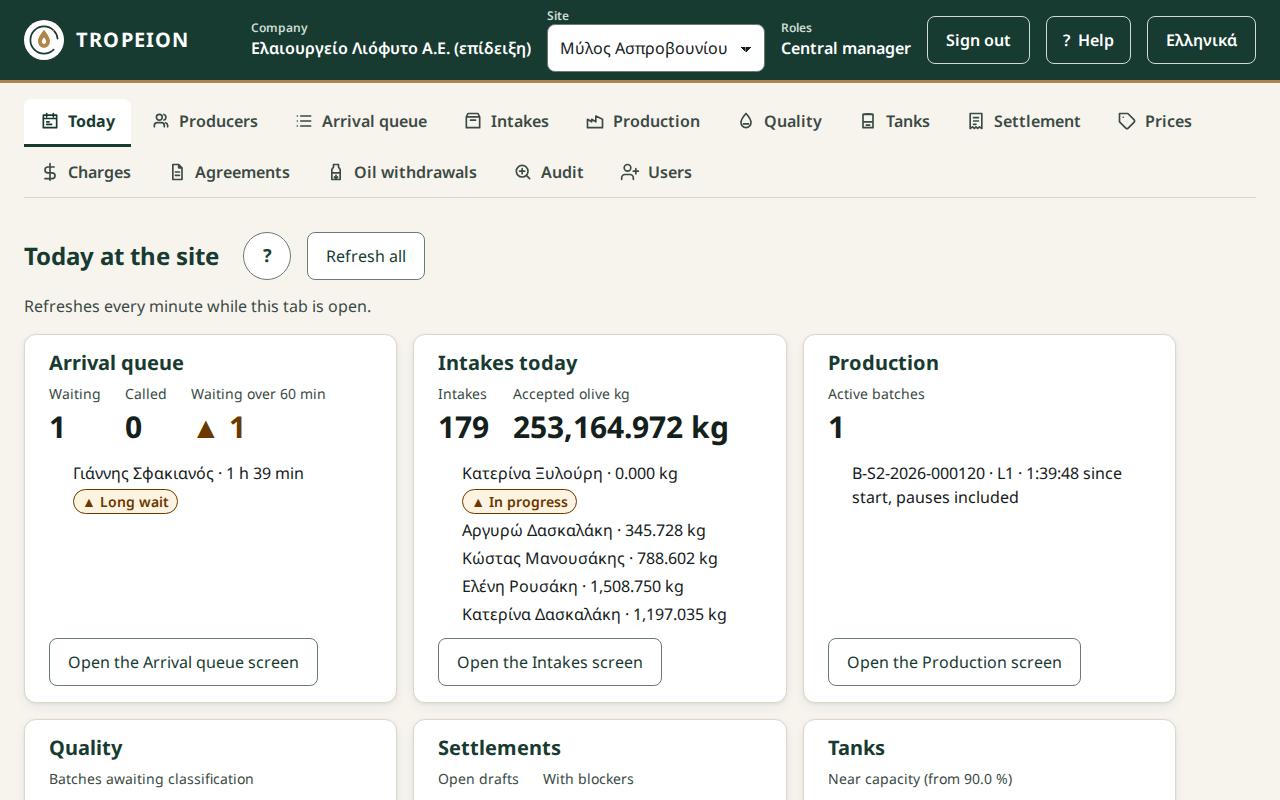
Example: two roles for one person
Someone holds Intake operator and Cashier and settlement officer. They see Today, Producers, Arrival queue, Intakes, Settlement, Prices (view only), Charges (view only) and Oil withdrawals. After signing in, Settlement opens first, because they hold the Cashier and settlement officer role.
The first screen after signing in
The rules are checked in this order, and the first one that matches applies:
- Today: Site manager, Central manager, Accountant and back office, Auditor (read-only).
- Production: someone who holds only the Production operator role.
- Quality: Quality officer.
- Settlement: Cashier and settlement officer.
- Tanks: Warehouse and tank operator.
- Producers: everyone else.
The Today screen
Every role except Queue display (view only) and Platform operator (tenant onboarding) sees Today, with one tile for each of its screens that has a tile: Arrival queue, Intakes, Production, Quality, Settlement, Tanks and Audit. Today only shows. The work is done on the screen the tile opens.
A new sign-in for critical actions
For some critical actions the application asks you to sign in again, even though you are already signed in. This confirms that you are the person doing the action.
- If you signed in within the last 5 minutes, the action goes through at once.
- Otherwise the sign-in page opens. After you sign in, you return to the same screen and the action is sent once, exactly as you confirmed it.
Below, these actions are marked "(new sign-in)".
These actions do not ask for a new sign-in: completing a production batch, finalizing a settlement, daily prices, the charges of one site, and the oil withdrawal request and delivery.
Intake operator
Who it is for. Whoever works at the counter and the scale: receives producers, books appointments, calls the queue, weighs and receives the olives. A site role.
Screens. Today, Producers, Arrival queue, Intakes. They also open Fast intake and Lot detail, which have no button of their own. First screen after signing in: Producers.
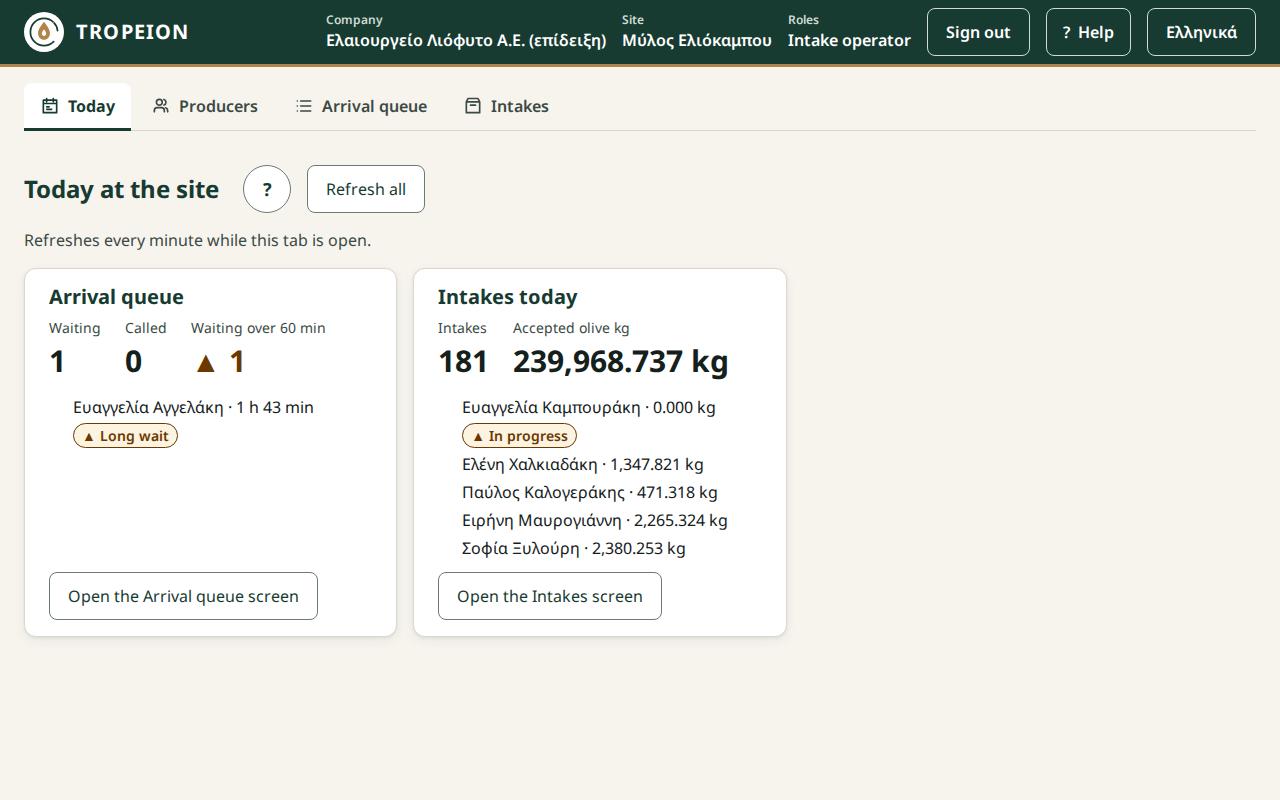
What they can do:
- Producers: search and view by AFM and details, New producer, Edit details (contacts, address, tax office, VAT regime), Parcels (new, change, deactivate) with their map. In Fast intake they choose the parcel as the lot's origin.
- Arrival queue:
- new walk-in arrival;
- call the first in the queue;
- cancel an arrival;
- record the arrival of an appointment;
- new appointment, record a confirmation, cancel an appointment, mark "did not show up";
- start and open an intake.
- Fast intake:
- new lot, weighing, acceptance, save as draft;
- cancel a lot that was not accepted;
- print a label;
- complete the intake and give the intake receipt (not a tax document);
- cancel the intake and the arrival, while there is no accepted lot;
- weight correction on an accepted lot that has not yet gone into production (new sign-in).
- Intakes: the list, filters, opening an intake with all its actions.
- Lot detail: split a lot (new sign-in), print the label of the new lot.
What they can only view. Today, with tiles for the Arrival queue and Intakes.
Actions with a new sign-in. The weight correction and the lot split.
A typical day. In the morning they check the day's appointments. During the day they record arrivals, call the next producer, weigh, accept lots, print labels and hand over the intake receipt. If they find a weight mistake before the lot goes into production, they make a weight correction.
What they cannot do, and who does it:
- They do not change someone's position in the queue. The Site manager or the Central manager does it, with a reason.
- They do not reverse a lot split. The Site manager or the Central manager does.
- They never see the producer's fee terms. If the producer has no agreement, the system creates one automatically from the site default terms. The Site manager or the Central manager sets the terms in Agreements.
- They do not work in Production, Quality, Tanks, Settlement or Oil withdrawals. Those belong to the matching roles.
Production operator
Who it is for. Whoever works at the machine: makes production batches, starts them, records measurements and completes them into the tanks. A site role.
Screens. Today, Producers, Production, Quality, Tanks. Someone with only this role starts on Production.
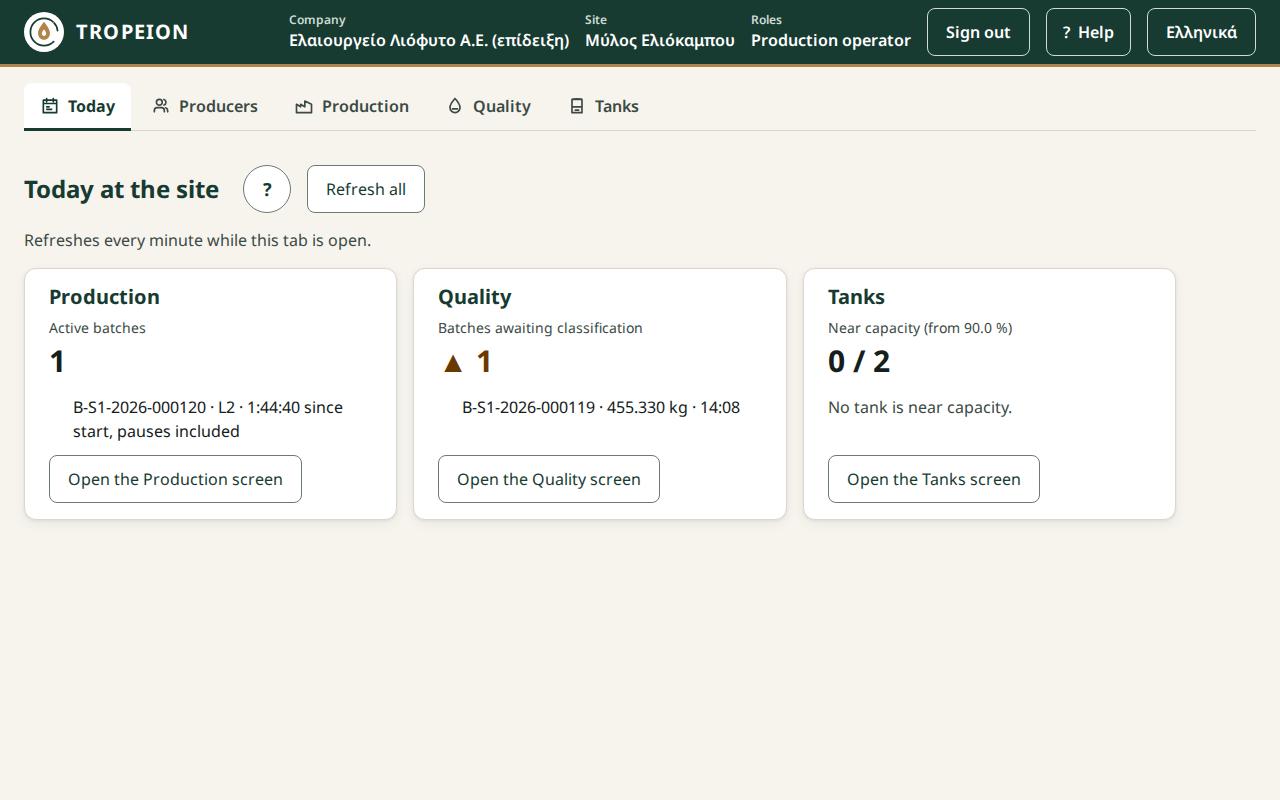
What they can do:
- Producers: search, view, New producer, Edit details, Parcels (new, change, deactivate) with their map.
- Production:
- new production batch, add and remove inputs;
- start, pause, resume;
- record a measurement, acknowledge a warning;
- complete: oil, tanks, by-products. Completing does not ask for a new sign-in;
- cancel a draft batch, before it starts (new sign-in).
- Quality: record line cleaning.
What they can only view. The rest of the Quality screen, and Tanks.
Actions with a new sign-in. Cancelling a draft batch.
A typical day. They take the olive lots received at the counter and make a production batch. They start it, record measurements and acknowledge any warning that appears. At the end they complete it, stating which tanks the oil went into and which by-products came out. When the line is cleaned, they record it in Quality.
What they cannot do, and who does it:
- They do not cancel a batch that has started and do not correct an input weight. The Site manager and the Central manager do.
- They do not record lab measurements or finalize the quality classification. The Quality officer does.
- They do not count or transfer oil in the tanks. The Warehouse and tank operator does.
- They do not work in the Arrival queue, Intakes or Settlement.
Quality officer
Who it is for. Whoever does the lab measurements and decides the quality class of each production batch. In a small mill this is usually the owner. A site role.
Screens. Today, Producers, Quality, Prices. First screen after signing in: Quality.
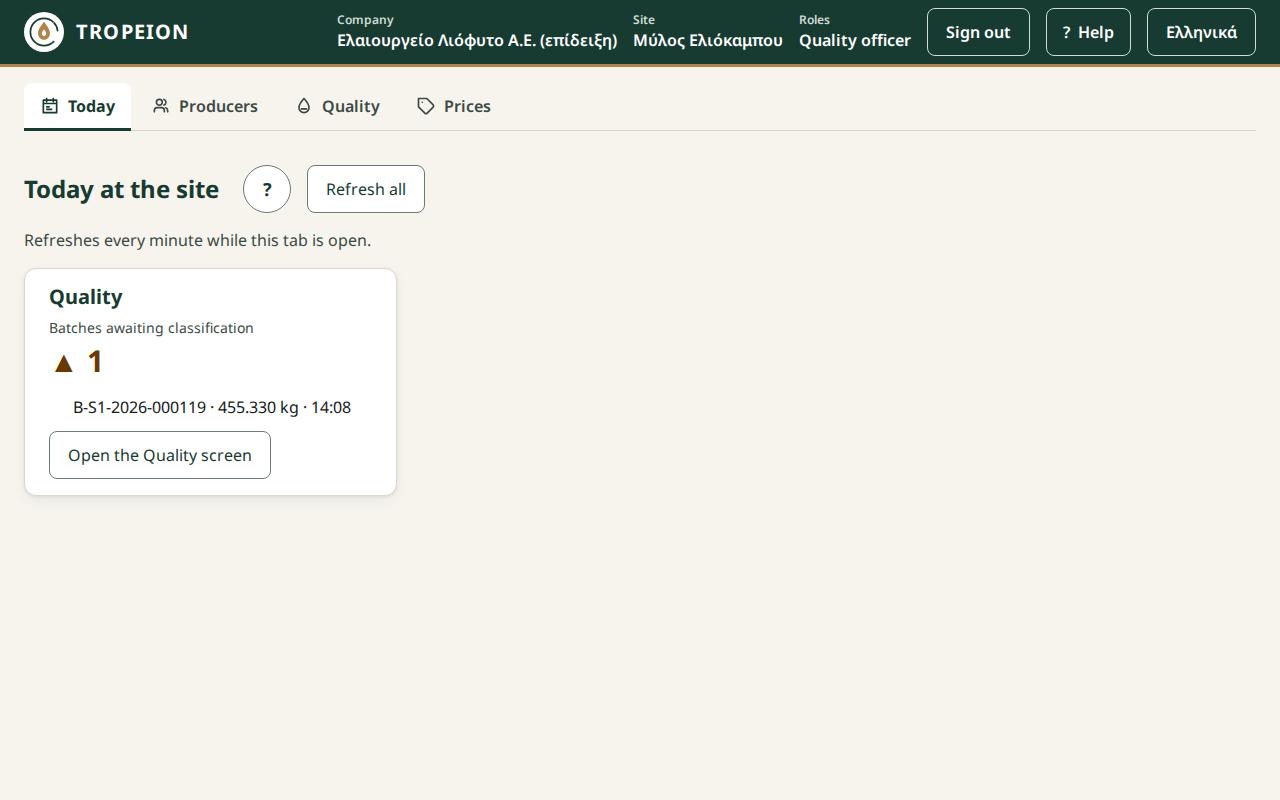
What they can do:
- Producers: search, view, New producer, Edit details, Parcels (new, change, deactivate) with their map.
- Quality:
- lab measurements;
- finalize the quality classification;
- correct a classification with a new decision, without erasing the earlier one;
- record line cleaning.
What they can only view. Prices.
Actions with a new sign-in. None.
Why this role is required. Only the Quality officer finalizes the quality classification. Neither the Site manager nor the Central manager can. This is deliberate: whoever sets prices and pays does not also decide the quality. If a batch has no final classification, its settlement shows the blocker "BLOCKER — Batch … has no final quality classification." and cannot be finalized. So at every site someone must hold this role.
A typical day. In Quality they see which batches are waiting for classification. They enter the lab measurements and finalize the class, so that settlements can go ahead. They also record line cleanings.
What they cannot do, and who does it:
- They do not set or correct prices. The Site manager and the Central manager do.
- They do not make settlements. The Cashier and settlement officer does.
- They do not see Production, Tanks or Settlement.
Warehouse and tank operator
Who it is for. Whoever looks after the tanks: counts the oil, moves it from tank to tank and hands it over to the producer. A site role.
Screens. Today, Producers, Tanks, Oil withdrawals. First screen after signing in: Tanks.
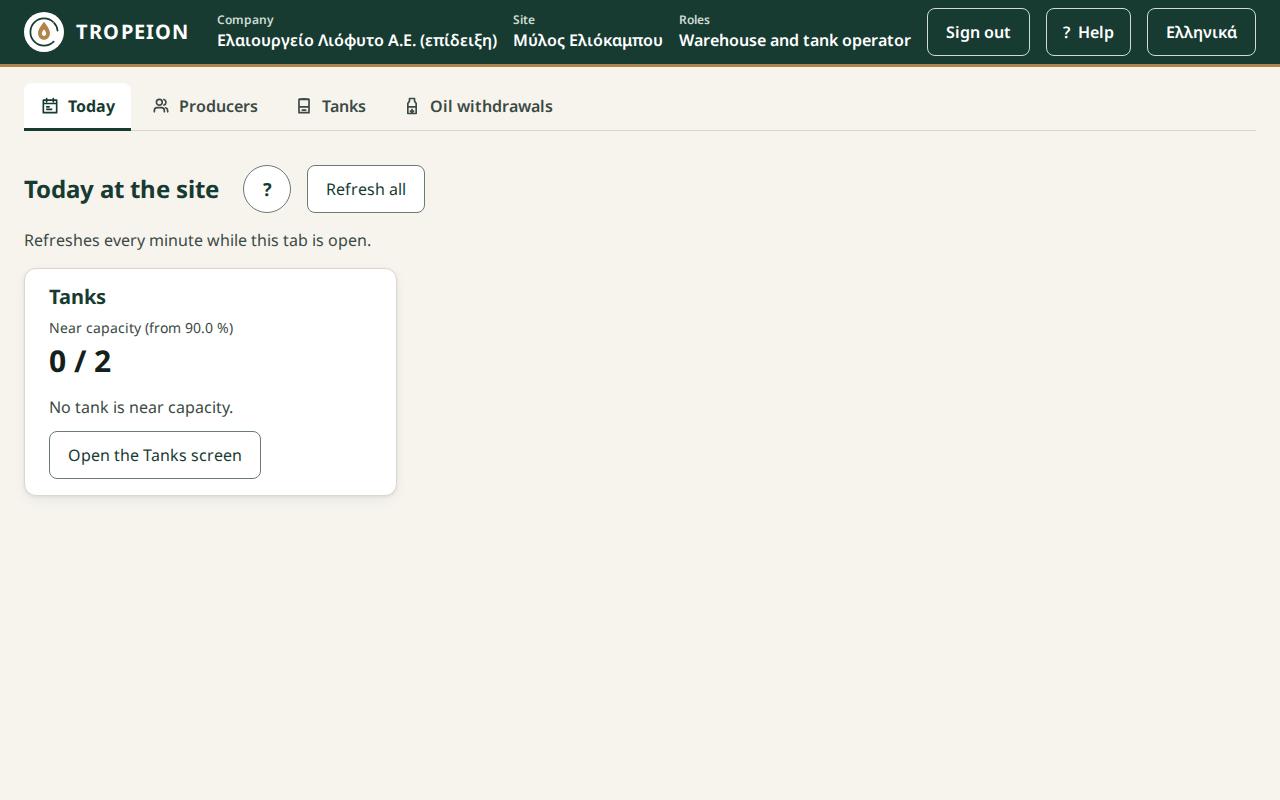
What they can do:
- Producers: search, view, New producer, Edit details, Parcels (new, change, deactivate) with their map.
- Tanks: a tank count in kg, an oil transfer from tank to tank.
- Oil withdrawals: deliver oil on an open request, print the delivery paper.
What they can only view. The withdrawal requests they do not deliver.
Actions with a new sign-in. None.
A typical day. They deliver oil to producers who have an open request and print the paper. They move oil where needed. In the evening they count the tanks.
What they cannot do, and who does it:
- They do not create or close a withdrawal request. The Cashier and settlement officer does.
- They do not reverse a delivery. The Site manager and the Central manager do.
- They do not work in Production or Settlement.
Cashier and settlement officer
Who it is for. Whoever settles accounts with the producer: makes and finalizes the settlement, and opens the request so the producer can take their oil. A site role.
Screens. Today, Producers, Settlement, Prices, Charges, Oil withdrawals. First screen after signing in: Settlement.
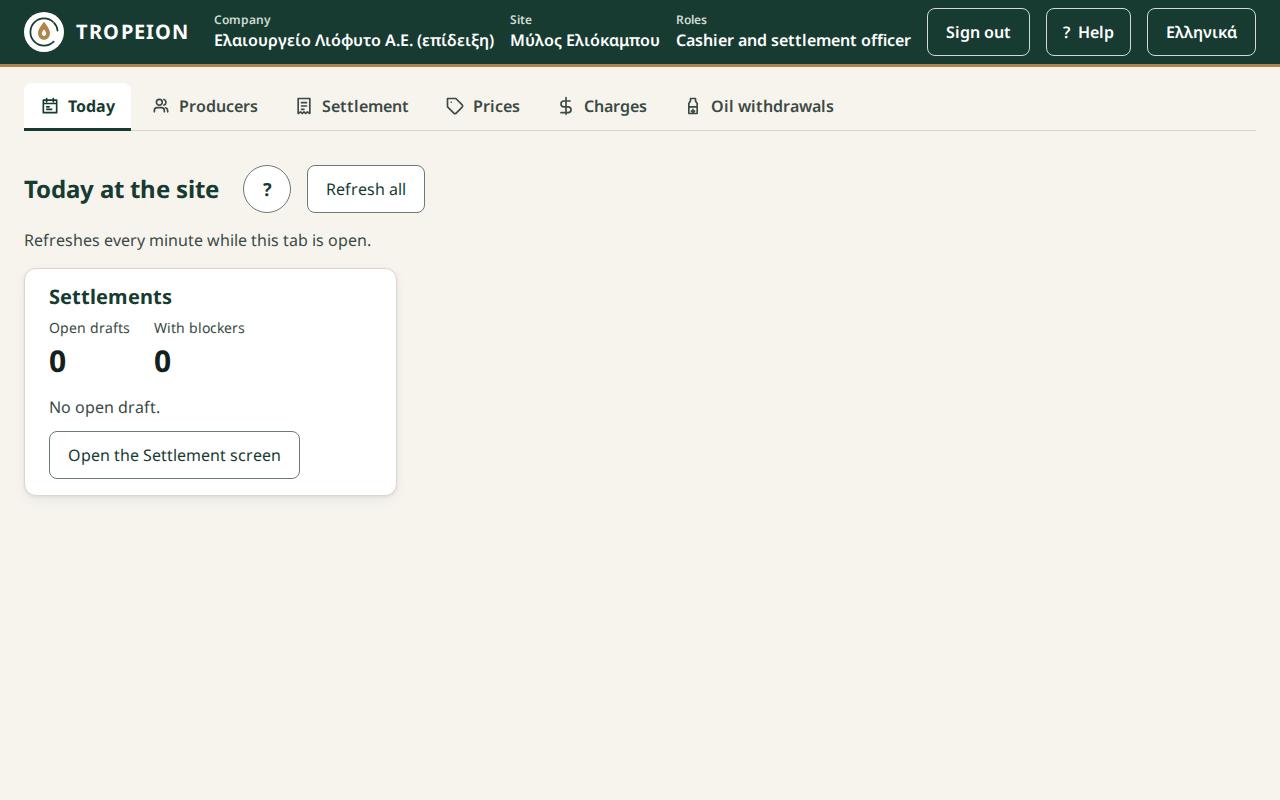
What they can do:
- Producers: search, view, New producer, Edit details, Parcels (new, change, deactivate) with their map.
- Settlement:
- new draft, discard a draft;
- choose the optional charges and the units in the draft;
- finalize. This does not ask for a new sign-in;
- print the settlement statement.
- Oil withdrawals: new request, close a request, deliver oil from the tanks, print the delivery paper.
What they can only view. Prices and Charges.
Actions with a new sign-in. None.
A typical day. When a producer comes to settle, the cashier makes a draft, chooses the optional charges that apply and checks that there are no blockers. Then they finalize, print the statement and open a withdrawal request for the oil.
What they cannot do, and who does it:
- They do not reverse a final settlement or make a replacement settlement. The Site manager and the Central manager do.
- They do not enter prices. At the "No price" blocker they see "Ask a manager to enter a price for …". The Site manager or the Central manager enters the price.
- They do not change charges. The Site manager and the Central manager set them. The cashier only chooses the optional ones inside Settlement.
- They do not classify quality. At the classification blocker they see "Ask the quality officer to classify batch …".
- They do not reverse an oil delivery. The Site manager and the Central manager do.
- They do not see Agreements.
Site manager
Who it is for. The person in charge of one olive mill (one site). They do almost all of the site's work, set prices and terms, make corrections and manage the site's users. A site role.
Screens. Today, Producers, Arrival queue, Intakes, Production, Quality, Tanks, Settlement, Prices, Charges, Agreements, Oil withdrawals, Audit, Users. They also open Fast intake and Lot detail. First screen after signing in: Today.
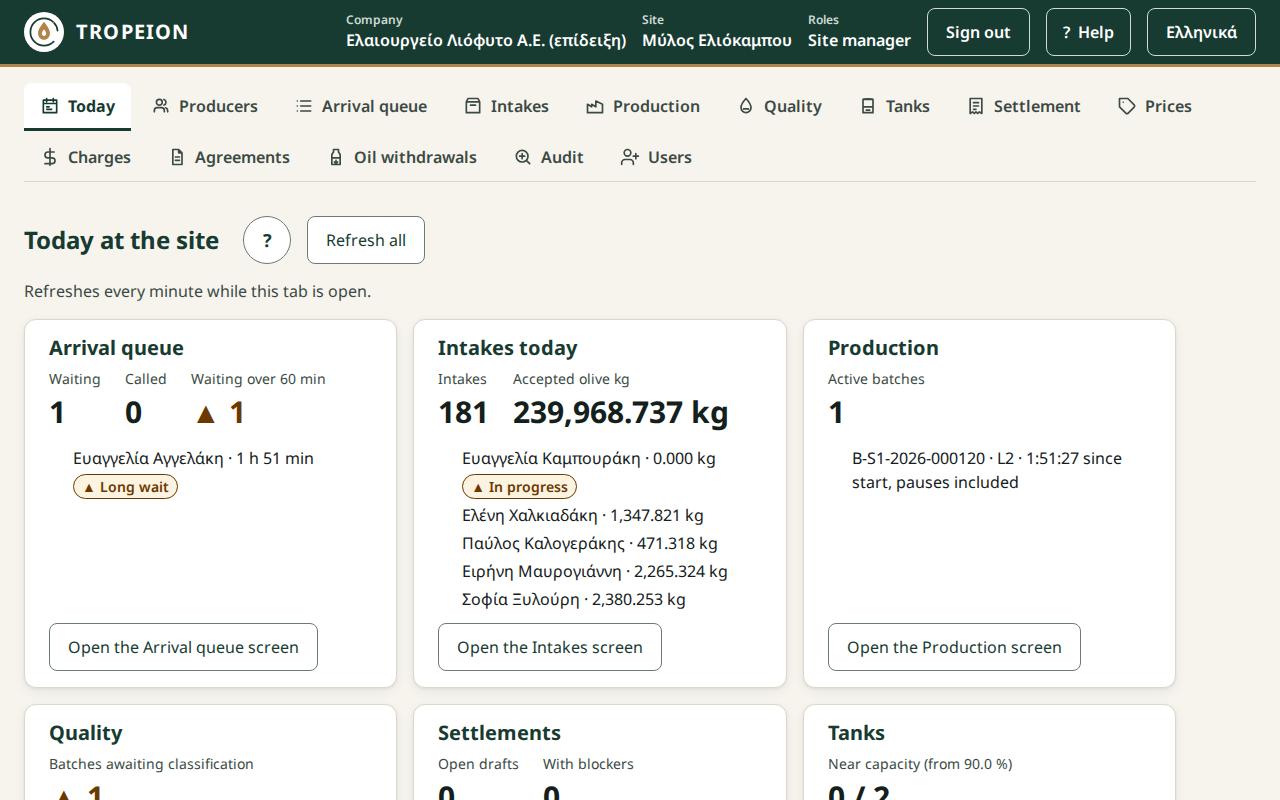
What they can do: everything the Intake operator, the Production operator (except line cleaning), the Warehouse and tank operator and the Cashier and settlement officer do at their site. In addition:
- Arrival queue: change a position, with a reason (new sign-in).
- Lot detail: reverse a split (new sign-in).
- Production: cancel a batch that has started (new sign-in), correct an input weight (new sign-in).
- Settlement:
- reverse a final settlement (new sign-in);
- a replacement draft and its finalization;
- enter a price from the "No price" blocker.
- Prices: enter and correct a daily price, with a reason.
- Charges:
- new charge, new version, withdraw;
- copy to all sites (new sign-in), only if they hold the Site manager role at every site of the company.
- Agreements:
- new site default terms (new sign-in);
- apply them to the producers who follow the default terms (new sign-in);
- a new version with a producer's own terms; activating the version asks for a new sign-in;
- copy default terms or a producer's terms to all sites (new sign-in), under the same condition as in Charges.
- Oil withdrawals: everything the cashier and the warehouse operator do, plus reversing a delivery (new sign-in).
- Users: only the users of their own sites.
- Invite a new user by email.
- Change roles and end dates.
- Send the invitation again, password reset by email.
- Deactivate and reactivate (new sign-in).
- They grant only site roles: Intake operator, Production operator, Quality officer, Warehouse and tank operator, Cashier and settlement officer, Queue display (view only).
What they can only view:
- Quality;
- the Audit, for the chosen site only.
Actions with a new sign-in:
- changing a queue position;
- a weight correction at intake;
- splitting a lot and reversing the split;
- cancelling a draft production batch;
- cancelling a batch that has started;
- correcting an input weight;
- reversing a settlement;
- reversing an oil delivery;
- new default terms and applying them;
- activating an agreement version;
- every copy to all sites;
- deactivating and reactivating a user.
A typical day:
- In the morning they enter the day's prices and look at Today.
- During the day they help where needed: at the counter, at the machine, at the cash desk. They change the queue order when there is a reason.
- They make the corrections and reversals the staff are not allowed to make.
- In the evening they take a look at the Audit.
What they cannot do, and who does it:
- They do not finalize a quality classification or record line cleaning. The Quality officer does the classification. Line cleaning is recorded by the Quality officer or the Production operator. To do these themselves, they also need the Quality officer role.
- They do not grant the Site manager, Central manager, Accountant and back office or Auditor (read-only) roles. The Central manager grants them.
- They do not change managers, the Accountant and back office, auditors, or users who also work at another site. Next to the button it says "…the Central manager manages them".
- They do not change their own roles.
- They do not see other sites, not even in the Audit.
Central manager
Who it is for. The owner or general manager of the company. They have every capability of the Site manager at every site, and manage all users. A company role.
Screens. The same as the Site manager: Today, Producers, Arrival queue, Intakes, Production, Quality, Tanks, Settlement, Prices, Charges, Agreements, Oil withdrawals, Audit, Users. They see one site at a time and switch it in the "Work context" bar. First screen after signing in: Today.
What they can do: everything the Site manager does, at every site. In addition:
- Copy to all sites for charges, default terms and a producer's terms (new sign-in), with no further condition.
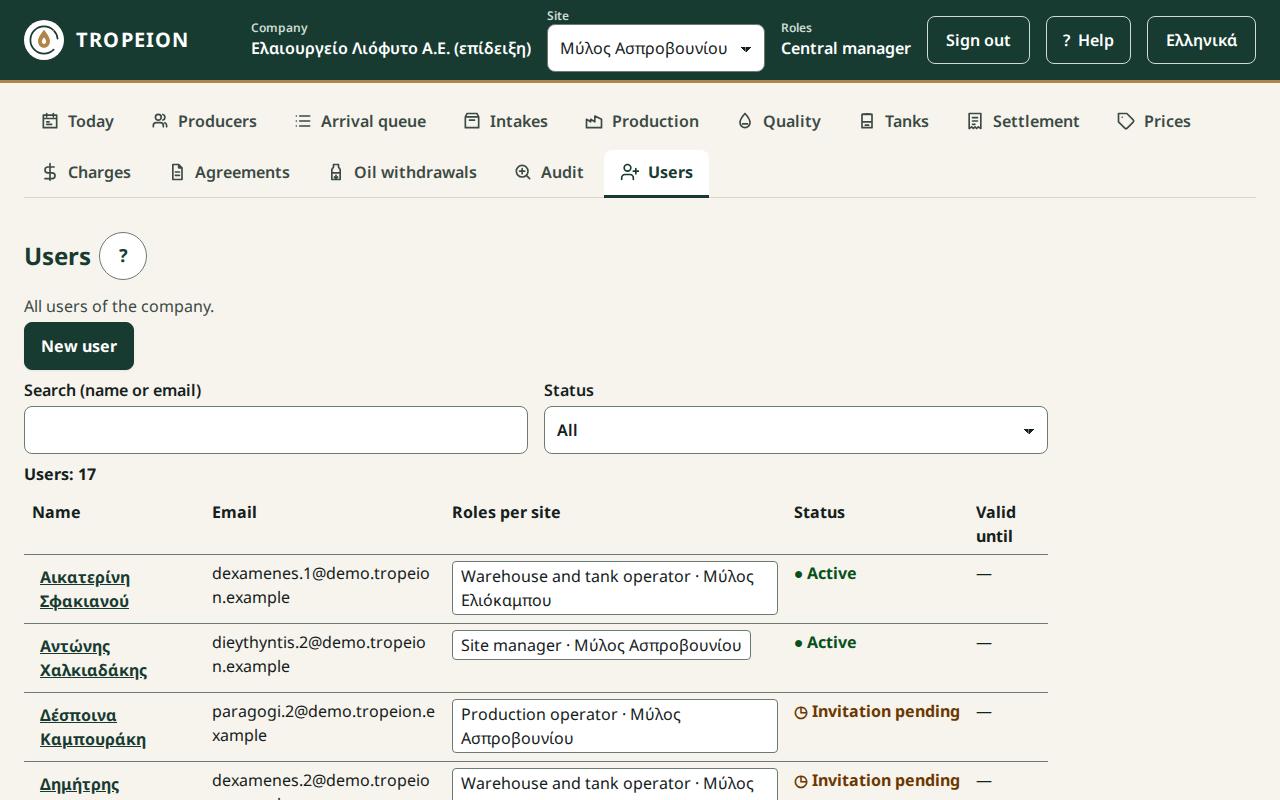
- Users: every user of the company and every role, including the company roles.
- A new sign-in is asked when they grant, remove or change the Site manager, Central manager, Accountant and back office or Auditor (read-only) role.
- A new sign-in is always asked to deactivate and reactivate.
- They can change or deactivate another Central manager.
- The company cannot be left without an active Central manager. In that case they see "Not possible: the company would be left with no active Central manager…" and must first appoint another Central manager without an end date.
What they can only view:
- Quality;
- the Audit, for the whole company, with the Site filter.
Actions with a new sign-in. All those of the Site manager. In addition, inviting and changing roles when the Site manager, Central manager, Accountant and back office or Auditor (read-only) role is involved.
A typical day. They check Today for each site. They set or approve prices, terms and charges. They make corrections and reversals. They manage users and look at the Audit.
What they cannot do, and who does it:
- Like the Site manager, they do not finalize a quality classification or record line cleaning. To do these themselves, they also need the Quality officer role at the site.
- They do not change their own roles. If they are the only Central manager, they cannot give themselves the Quality officer role. See "Small mill: how to share the roles".
Accountant and back office
Who it is for. The accounts office or the outside accountant. They see the data of every site, register new producers and correct their details. A company role.
Screens. Today, Producers, Intakes, Production, Quality, Tanks, Settlement, Prices, Charges, Oil withdrawals, Audit. They open an intake from the Intakes list, and Lot detail, for example from a row of the Audit, always read-only. First screen after signing in: Today.
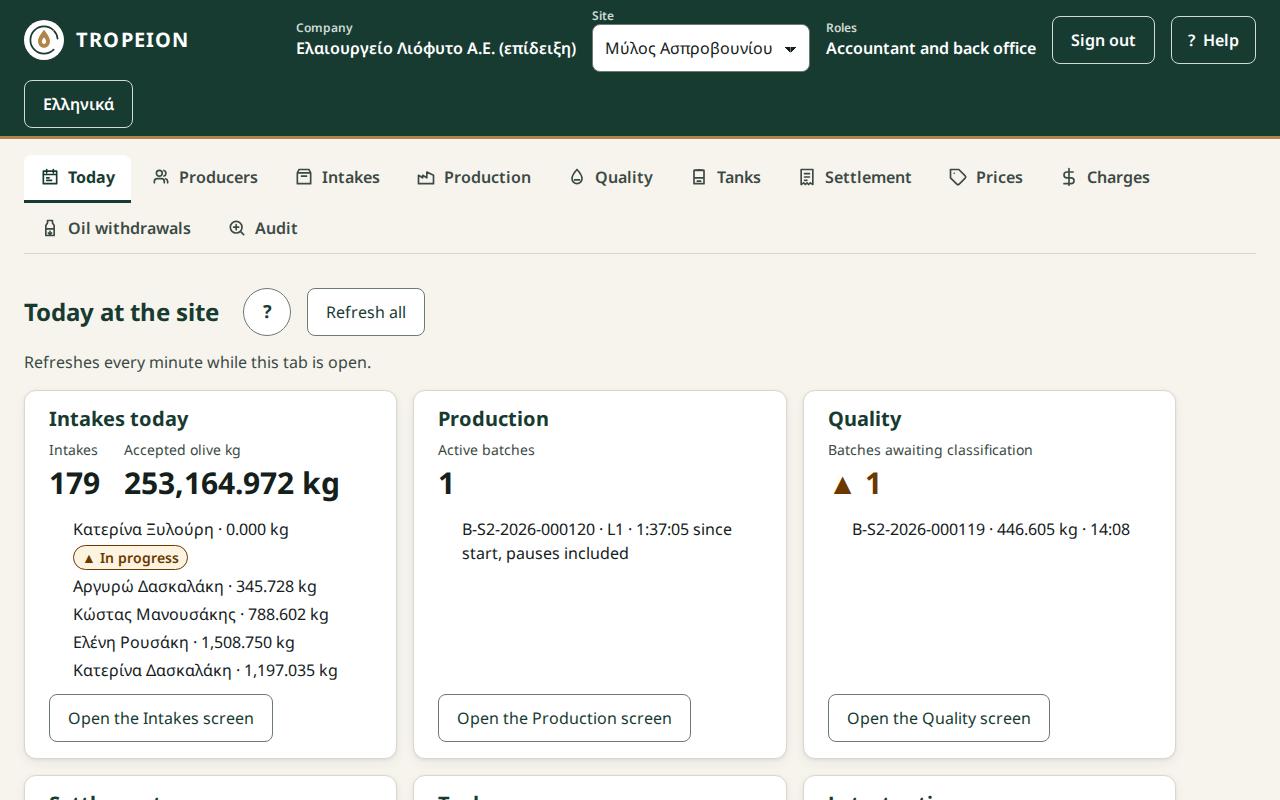
What they can do:
- Producers: search, view, New producer, Edit details, Parcels (new, change, deactivate) with their map.
- Settlement and Oil withdrawals: print the statement or delivery paper.
What they can only view:
- Intakes, Fast intake, Lot detail;
- Production, Quality, Tanks;
- Settlement, Prices, Charges, Oil withdrawals;
- the Audit, for the whole company, with the Site filter.
Actions with a new sign-in. None.
A typical day. They find intakes and settlements, reprint papers and check in the Audit who did what. They register new producers and update their address, tax office and VAT regime.
What they cannot do, and who does it:
- They change nothing in intake, production, quality, tanks, settlement, prices, charges or withdrawals. The site roles do that.
- They do not see the Arrival queue, Agreements or Users. They see fee terms only as they appear on each line of a Settlement.
Auditor (read-only)
Who it is for. Someone who checks without changing anything, for example an outside auditor. A company role.
Screens. The same as the Accountant and back office: Today, Producers, Intakes, Production, Quality, Tanks, Settlement, Prices, Charges, Oil withdrawals, Audit. First screen after signing in: Today.
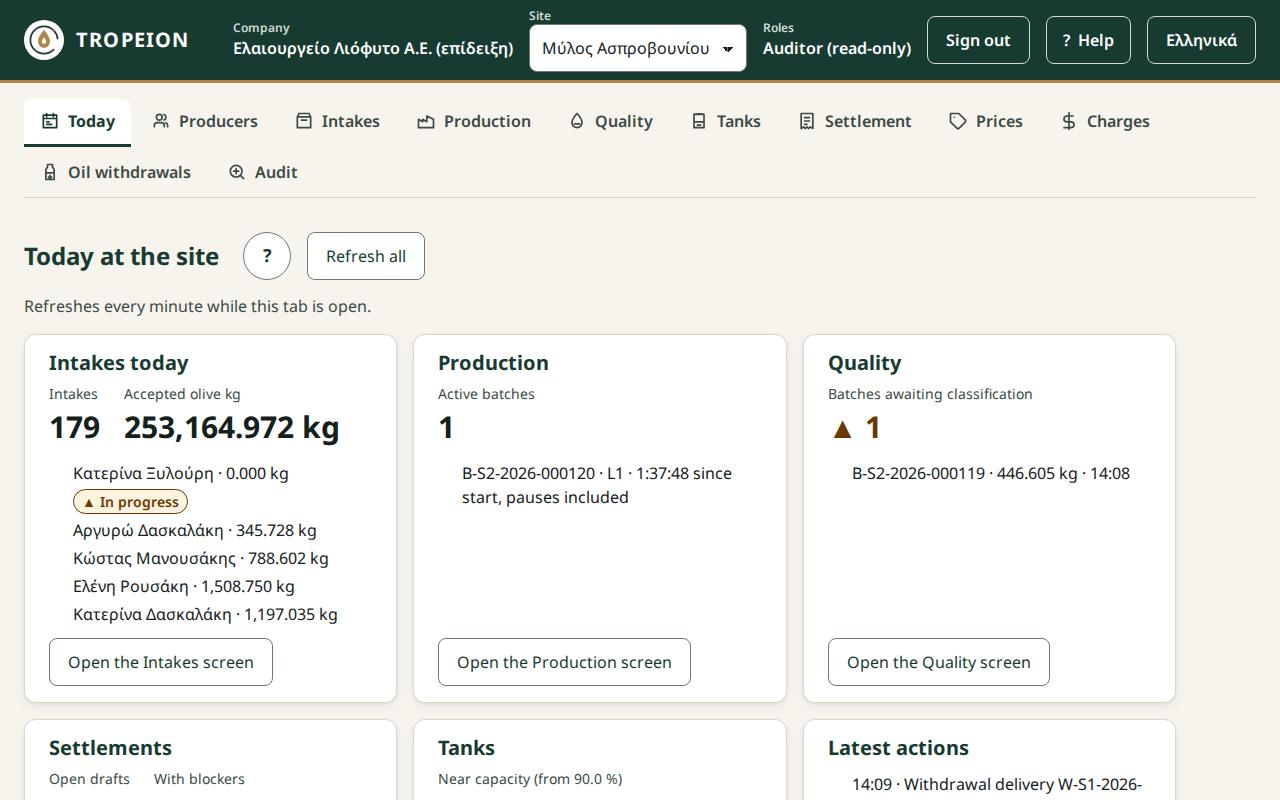
What they can do. Print papers in Settlement and Oil withdrawals. No other action.
What they can only view. All their screens, including Producers and their details (contacts, address, tax office, VAT regime), the Parcels and their map. They see the Audit for the whole company, with the Site filter.
Actions with a new sign-in. None.
A typical day. They search the Audit for who finalized, corrected or reversed something, and when. They open the related intakes, lots and settlements to read them.
What they cannot do, and who does it:
- They do not register a new producer or change their details or parcels. Every other role that sees Producers does.
- They change nothing.
- They do not see the Arrival queue, Agreements or Users.
Queue display (view only)
Who it is for. Not for a person. It is for the account of the computer or TV in the waiting room, where producers see their turn. A site role.
Screens. Only the public Waiting order display, with no screen buttons and no help link.
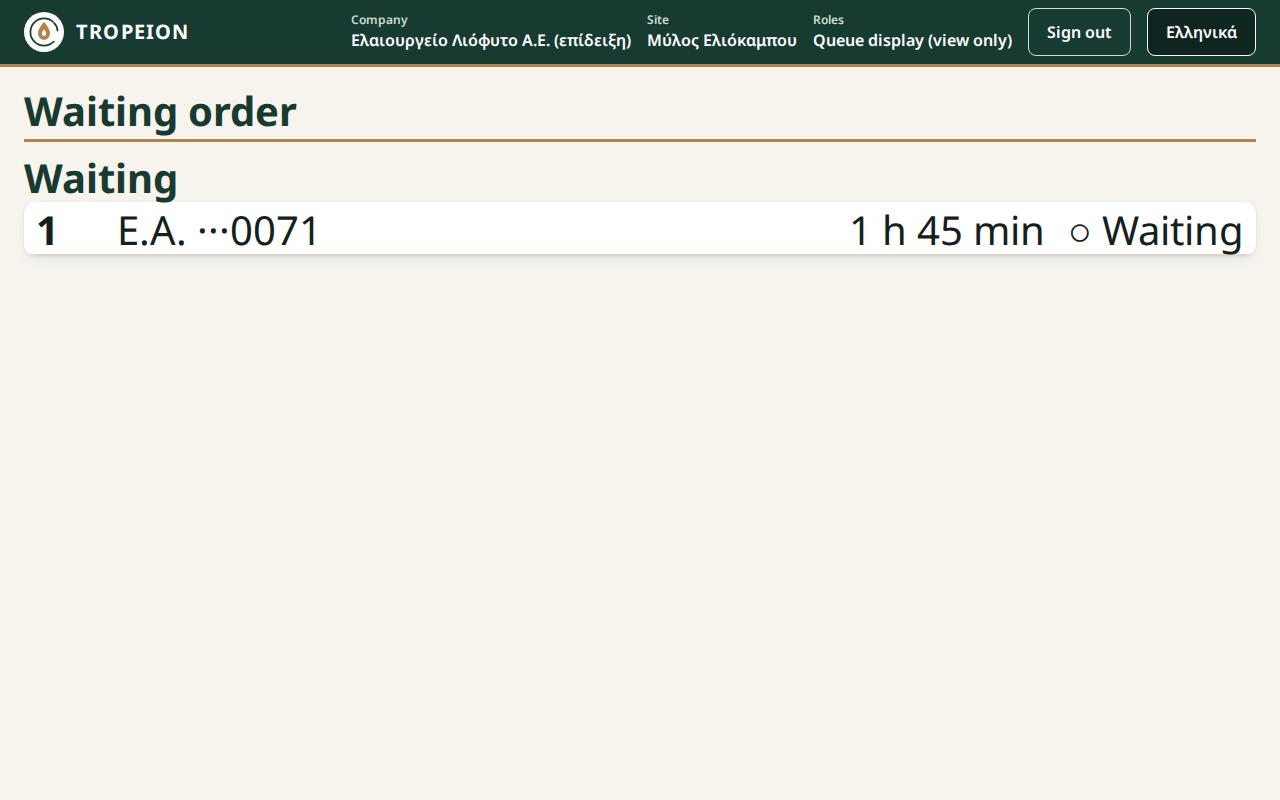
What it can do. No action. The display updates on its own while the browser tab is visible.
What it can only view. Who is called now and who is waiting. For each producer it shows the position, initials, the last 4 digits of the AFM, the waiting time and the state. It never shows a full name, a full AFM, kilograms or reasons.
Actions with a new sign-in. None.
Important:
- The display account must be a separate account with only this role.
- If an account also holds a role that works in the Arrival queue (Intake operator, Site manager, Central manager), the normal Arrival queue opens, with names, not the public display.
- Do not open the waiting-room display with your personal account.
Who grants it. The Site manager or the Central manager, from the Users screen, or from the start with the onboarding Excel.
Platform operator (tenant onboarding)
Who it is for. TROPEION's own staff only. With this role a new olive mill customer is created from the onboarding Excel. The olive mill does not give this role to anyone.
Screens. Only Tenant onboarding, with no screen buttons.
What they can do:
- download the Excel template;
- upload the filled-in file and see the check and the preview;
- confirm the creation of the customer (new sign-in);
- reject a batch, or close a batch whose invitations failed;
- follow the user invitations.
What they can only view. The state of the onboarding batch and of the invitations. They do not see any olive mill's data.
Actions with a new sign-in. Confirming the onboarding.
What they cannot do. They do not work on any olive mill screen. They do not change an existing customer. After onboarding, changes are made from the customer's own screens, for example users from the Users screen.
Small mill: how to share the roles
Most olive mills have fewer people than roles. That is normal. You do not need one employee per role: give each person the roles they need, and they will see the screens of all of them together.
Two things to know before you start
- Someone must hold the Quality officer role at every site. The Central manager and the Site manager do almost everything, but they do not finalize the quality classification. Without a classification, a settlement cannot be finalized. This is deliberate, so that prices, money and quality are not concentrated in one role. If the owner also does quality, they get the Quality officer role in addition.
- Nobody changes their own roles. If the owner is the only Central manager, they cannot later give themselves the Quality officer role. So they get it from the start, with the onboarding Excel. Otherwise a second Central manager must give it to them.
1 person
| Person | Roles |
|---|---|
| Owner | Central manager + Quality officer |
- They see every screen and do every action of the site.
- If the company has only one site, they can take Site manager instead of Central manager. We still suggest Central manager: it also grants company roles, such as Accountant and back office for the outside accountant, and is not tied to one site.
2–3 people
| Person | Roles | What it covers |
|---|---|---|
| Owner | Central manager + Quality officer | prices, agreements, charges, classification, corrections and reversals, users |
| Counter and cash desk | Intake operator + Cashier and settlement officer | queue, intake, settlement, oil requests and deliveries |
| Machine and storage | Production operator + Warehouse and tank operator | production batches, line cleaning, tanks, oil delivery |
With 2 people, the second person gets Intake operator + Production operator + Warehouse and tank operator. The owner does the settlements, which they are already allowed to do as Central manager.
5 or more people
- Central manager: the owner.
- Site manager: one per site.
- Work roles: one or two per person, from Intake operator, Production operator, Warehouse and tank operator, Cashier and settlement officer and Quality officer.
- Seasonal staff: a role with a Valid until date.
- Accountant and back office: for the accountant.
- Auditor (read-only): for a check by a third party.
- Queue display (view only): a separate account for the waiting-room display.
At the start: the onboarding Excel
When you start, TROPEION creates your company from the onboarding Excel.
- In the Users sheet, each row gives one role to one user, with the columns (headed in Greek) Email, Ονοματεπώνυμο (full name), Ρόλος (role), Εύρος (site/tenant) (scope) and Κωδικός ελαιοτριβείου (site code).
- For several roles, write several rows with the same email. Rows with the same email become one user, with all those roles, and one invitation.
- For a company role, such as Central manager, the Scope is
tenantand the Site code stays empty. - For a site role, such as Quality officer, the Scope is
siteand you fill in the Site code.
Example for the owner of a small mill: two rows with the same email. The first gives the Central manager role, with Scope tenant. The second gives the Quality officer role, with Scope site and the mill's site code.
The value to write in the Role column for each role is in the New tenant onboarding help.
Later: the Users screen
After onboarding, roles are changed on the Users screen:
- New user: an email invitation, with one or more role rows (site, role and an optional Valid until).
- Existing user: press their name. Add roles in Add roles. Each role has Remove now and End date.
- The Central manager grants every role. The Site manager grants only site roles, to the users of their sites.
- Nobody changes their own roles.
See How to invite a new user and How to change a user's roles.
Conflicts of interest, in plain words
When the owner does everything, these conflicts do not matter: the owner pays for every mistake. They matter when employees handle money or oil.
- Prices and finalizing a settlement. The Site manager and the Central manager can do both, and the system cannot separate them. If you want them separated, make it a working rule: the manager sets prices and the cashier finalizes. The cashier cannot change prices.
- The price changes the fee only in agreements with a monetary fee. In agreements with a percentage of the oil, the fee does not depend on the price.
- The price also affects charges in €, which are converted to oil at the daily price.
- Oil request and delivery by the same person. The Cashier and settlement officer can do both. If the Warehouse and tank operator makes the delivery, two people see the kilograms.
- Quality and the cash desk. The quality class decides which price applies to the settlement line. If the same person does both, nobody else checks the class.
- Weight correction by the Intake operator. It is allowed before the lot goes into production, with a new sign-in.
Two cheap safeguards:
- Do not give the same employee both Cashier and settlement officer and Quality officer.
- The owner takes a look at the Audit once a week. Every finalization, correction, price change and reversal shows there, with name and time.
Settlement and delivery reversals are already for managers only and ask for a new sign-in.
Summary table: role × screen
Key: ✓ = takes actions, 👁 = view only, – = does not see the screen.
| Screen | Intake operator | Production operator | Quality officer | Warehouse and tank operator | Cashier and settlement officer | Site manager | Central manager | Accountant and back office | Auditor (read-only) | Queue display (view only) | Platform operator (tenant onboarding) |
|---|---|---|---|---|---|---|---|---|---|---|---|
| Today | 👁 | 👁 | 👁 | 👁 | 👁 | 👁 | 👁 | 👁 | 👁 | – | – |
| Producers | ✓ | ✓ | ✓ | ✓ | ✓ | ✓ | ✓ | ✓ | 👁 | – | – |
| Arrival queue | ✓ | – | – | – | – | ✓ | ✓ | – | – | – | – |
| Intakes | ✓ | – | – | – | – | ✓ | ✓ | 👁 | 👁 | – | – |
| Fast intake | ✓ | – | – | – | – | ✓ | ✓ | 👁 | 👁 | – | – |
| Lot detail | ✓ | – | – | – | – | ✓ | ✓ | 👁 | 👁 | – | – |
| Production | – | ✓ | – | – | – | ✓ | ✓ | 👁 | 👁 | – | – |
| Quality | – | ✓ (1) | ✓ | – | – | 👁 | 👁 | 👁 | 👁 | – | – |
| Tanks | – | 👁 | – | ✓ | – | ✓ | ✓ | 👁 | 👁 | – | – |
| Settlement | – | – | – | – | ✓ | ✓ | ✓ | 👁 | 👁 | – | – |
| Prices | – | – | 👁 | – | 👁 | ✓ | ✓ | 👁 | 👁 | – | – |
| Charges | – | – | – | – | 👁 | ✓ | ✓ | 👁 | 👁 | – | – |
| Agreements | – | – | – | – | – | ✓ | ✓ | – | – | – | – |
| Oil withdrawals | – | – | – | ✓ (2) | ✓ | ✓ | ✓ | 👁 | 👁 | – | – |
| Audit | – | – | – | – | – | 👁 (3) | 👁 | 👁 | 👁 | – | – |
| Users | – | – | – | – | – | ✓ (4) | ✓ | – | – | – | – |
| Waiting order (public display) | – | – | – | – | – | – | – | – | – | 👁 | – |
| Tenant onboarding | – | – | – | – | – | – | – | – | – | – | ✓ |
Notes:
- The Production operator records line cleaning only. Only the Quality officer finalizes the classification.
- The Warehouse and tank operator only delivers on an open request and prints the paper.
- The Site manager sees the Audit for the chosen site only. The Central manager, the Accountant and back office and the Auditor (read-only) see it for the whole company.
- The Site manager manages only the users of their own sites and grants only site roles.
The Accountant and back office and the Auditor (read-only) print papers in Settlement and Oil withdrawals, although otherwise they only view. Fast intake, Lot detail, Waiting order and Tenant onboarding have no screen button of their own.
Exercise on the demo
Play the "2–3 people" setup with four demo accounts. The passwords are on the demo sign-in page. The demo resets every night.
kentriki(Central manager): enter the day's price.ypodochi.1(Intake operator): make an intake.poiotita.1(Quality officer): finalize the classification. In a real small mill, the owner holds this role.tameio.1(Cashier and settlement officer): make the settlement.
Each demo account holds a single role, so you switch accounts at each step. Note who would do each step in your own mill.
Self-check
- Who finalizes the quality classification?
- Can the Site manager grant the Accountant and back office role?
- Does finalizing a settlement ask for a new sign-in?
- Can the Warehouse and tank operator open a withdrawal request?
- The owner is the only Central manager. Can they give themselves the Quality officer role?
Answers:
- Only the Quality officer.
- No. Only the Central manager grants company roles.
- No.
- No. They only deliver. The Cashier and settlement officer opens the request.
- No, because nobody changes their own roles. They get it from the start with the onboarding Excel, or a second Central manager gives it to them.