Screen: Settlement
How to print a settlement statement
The settlement statement is the paper you give the producer with the figures of a finalized settlement. It is not a fiscal document: it has no fiscal numbering and says so at the top and the bottom.
Before you start
- The settlement is Finalized. A draft or a reversed settlement does not print.
- The computer has a printer, or you want to save the statement as a PDF from the browser's print dialog.
Steps
- Press Settlement in the row of screens.
- Under Status choose Finalized and open the settlement.
- In the Settlement statement section, press Print statement.
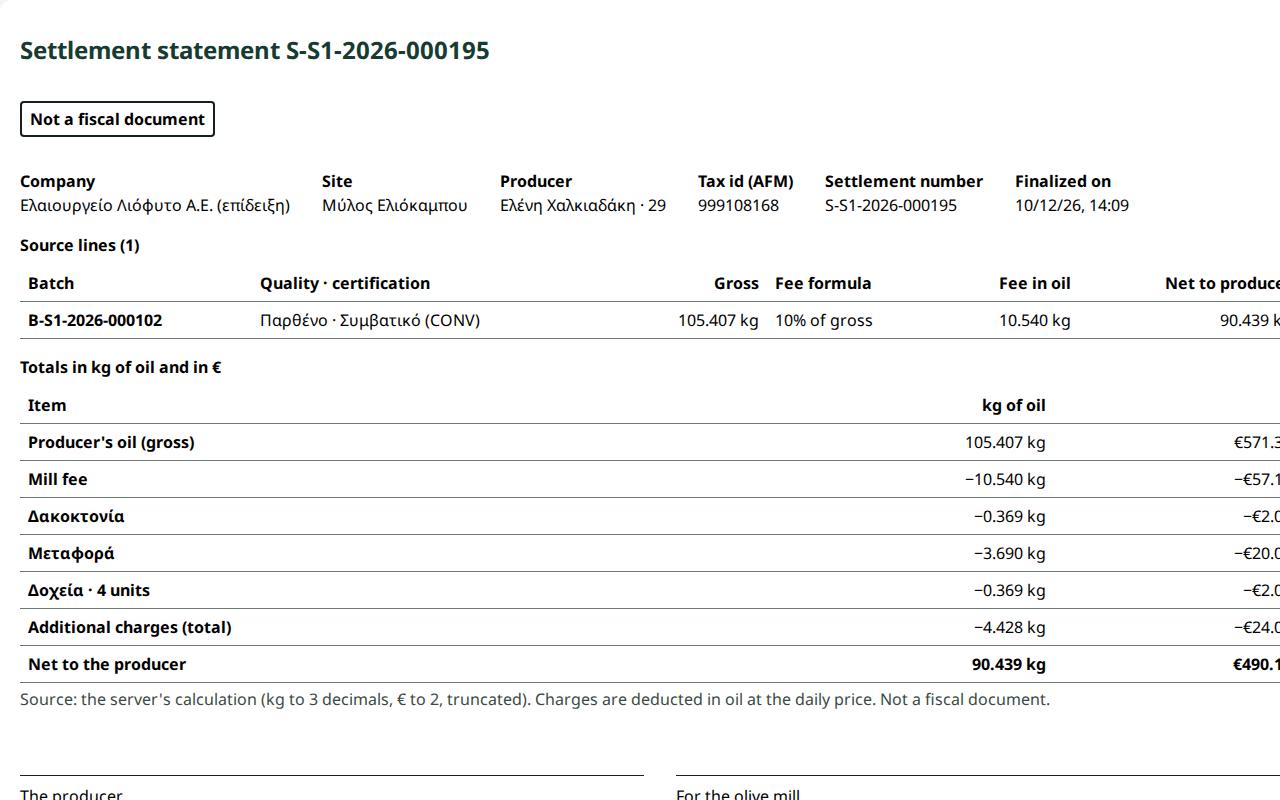
- Settlement statement … opens with: the company and the site; the producer, their number and the Tax id (AFM); the settlement number and the finalization date; the lines (batch, quality, gross, fee formula, fee, net); the totals; the signature lines "The producer" and "For the olive mill"; and the marking "Not a fiscal document".
- Check the figures and press Print. Only the statement goes on paper, without buttons or menus.
- Press Back to the settlement.
What if…
- …I do not see the Print statement button. The settlement is not finalized. Finalize it first; see How to finalize a settlement.
- …it says "The producer could not be loaded; the statement did not open." Check the connection and press Print statement again.
- …the settlement was wrong. The statement is not corrected. Reverse and replace the settlement and print the new settlement's statement; see How to reverse and replace a settlement.
- …the producer asks for an invoice or a receipt. The statement does not replace them. Fiscal documents are issued outside this application.