Screen: Fast intake
Weigh and receive olives
Before you start
- The producer is in the queue and has been called (state "▶ Called").
- The scale is free and you know each lot's net weight, or its gross and tare.
- The label printer is on, if your site has one.
Steps
- In the Arrival queue, press Start intake on the producer's row.
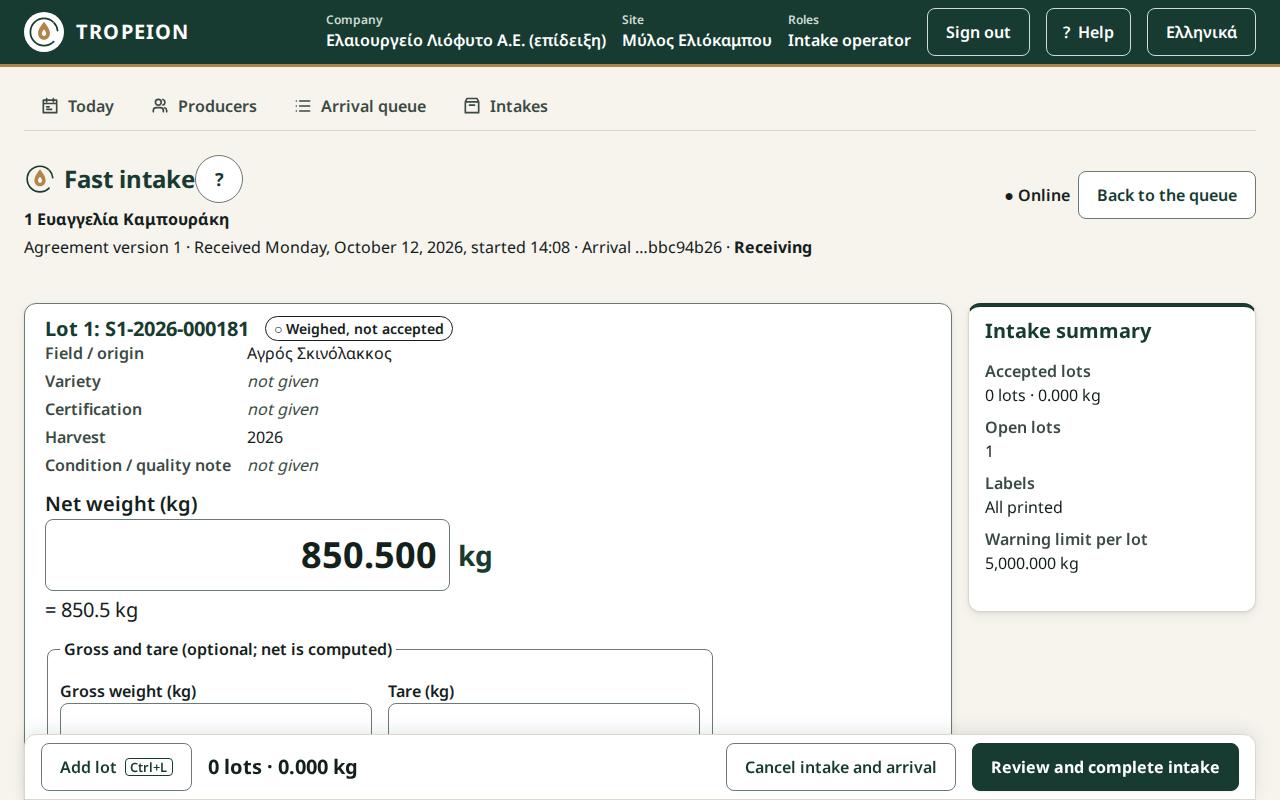
- Fast intake opens with the first card "New lot 1 (not saved)" and the cursor in Field / origin. Check the producer's number and name at the top.
- Fill in what you know: Field / origin, Variety, Certification and Condition / quality note. Enter moves to the next field. None is mandatory.
- In Net weight (kg) type the kilograms, for example
1250.375(up to 3 decimals, no thousands separator). Check the line below, for example "= 1,250.375 kg".- If you have gross and tare, type them in Gross weight (kg) and Tare (kg). The net is computed for you.
- Press Enter or Accept lot · ….
- You see "Lot … accepted · …. Print the label with Ctrl+P."
- Press Ctrl+P or Print label … and stick the label on the crate or sack. See Print a label and a receipt.
- For the next lot press Add lot or Ctrl+L. The new card already has the previous lot's origin, variety and certification ("Copied from previous lot"). Check them and repeat steps 4 to 7.
- When all lots are done, press Review and complete intake.
- Check the table with the producer. If everything is right, press Complete intake · … · ….
- You see "The intake is complete…". Press Print receipt (not fiscal) and give the receipt to the producer.
- Press Back to the queue for the next one.
On a tablet the steps are the same. Add lot and Review and complete intake are in the bottom sheet, and Previous lot / Next lot change the card.
What if…
- …the weight is above the site's limit. You see a warning. Weigh again or check what you typed. If it is right, press Confirm … and accept lot.
- …two lots have the same attributes. You see a warning. If they really are separate lots, press Accept lot with the same attributes · ….
- …a second weighing is needed before acceptance. Press Save as draft (not accepted) and accept the lot later.
- …you opened a card by mistake. Press Remove unsaved lot. If the lot was saved as a draft, press Cancel lot with a reason.
- …you accepted a wrong weight. See Correct an intake mistake.
- …the printer does not print. The lot stays accepted. Write the code on the crate and try again later. Completion is allowed.
- …completion says "The intake cannot be completed yet:". Read the list: accept or cancel every open lot, remove unsaved cards, wait for pending actions.
- …the producer leaves before you accept any lot. Press Cancel intake and arrival with a reason.
- …the connection drops. Keep typing. Nothing is lost, but nothing is saved until it returns. Then press the same button again. It will not be recorded twice.
- …the intake does not start. See the messages of the Arrival queue, for example about an inactive agreement or a missing season.