Screen: Production console
How to complete a production batch
Before you start
- The batch is Running (not paused).
- You know how many kilograms of oil came out and which tanks they went to, to the gram.
- Every measurement warning has been acknowledged.
Steps
- Open the batch from the Production console.
- If it is paused, press Resume batch.
- If there is a warning card, write an Operator comment and press Acknowledge and continue.
- In Oil produced (kg) enter the kilograms, for example
1250.375. If no oil came out, enter0. - In Tank 1 choose a tank and in Quantity in tank 1 (kg) enter how many kilograms went there.
- If the oil went to more tanks, press + Add tank and fill in the new row.
- Check the line below. It must say "✓ Tanks total … = oil produced".
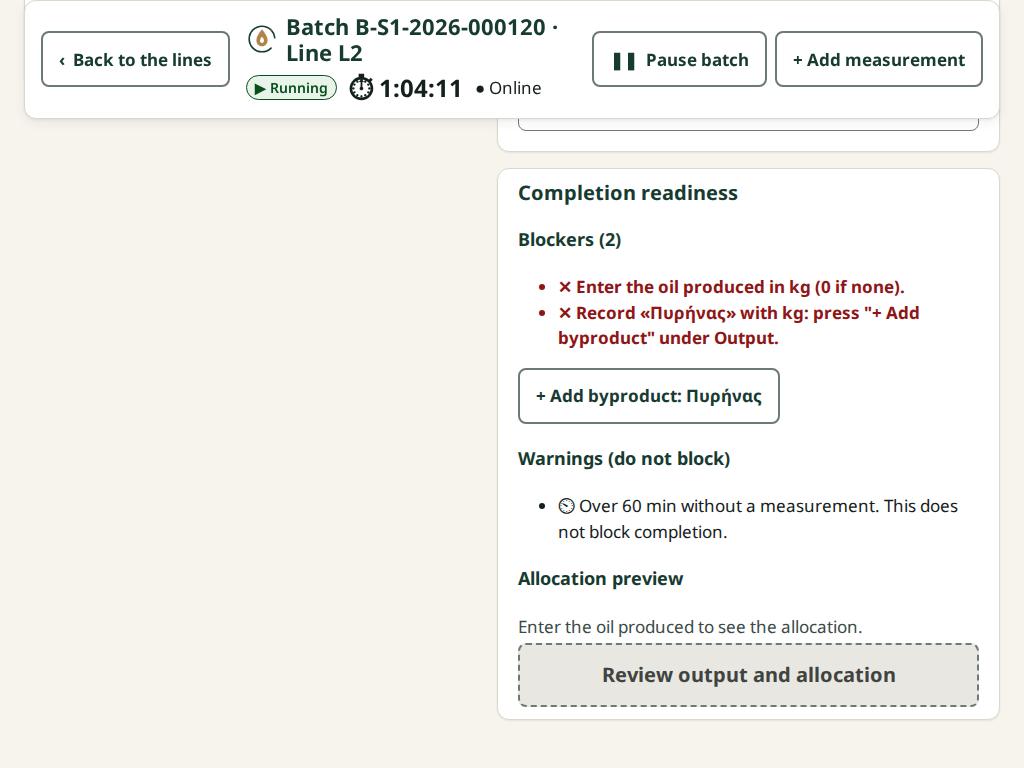
- If there are byproducts, press + Add byproduct, choose the type and, if you want, the kilograms. If the site requires the pomace, the blockers say "Record «Πυρήνας» with kg…": press + Add byproduct: Πυρήνας and enter the kilograms.
- Under Completion readiness, if "Unusual yield" appears, write a Comment on the yield.
- Check that Blockers says "No blockers."
- Press Review output and allocation.
- Check the Allocation preview: each producer, their share, their oil and the Rounding residual (mill).
- Press the button, which now reads "Complete batch · … into … tanks".
- You see "Batch … completed with … oil." and the final allocation.
After completion, the batch appears on the Quality screen for classification (if it produced oil).
What if…
- …it says "A destination tank would exceed its capacity…". Put fewer kilograms in that tank and the rest in another, with + Add tank.
- …it says "A destination tank holds oil of another certification or harvest…". The oil cannot be mixed there. Choose another or an empty tank.
- …the Warnings say "…at 90 % of its capacity or more" or "Over 60 min without a measurement". They do not block and need no comment. For the measurement, it is good practice to record one before completing.
- …it says "The tanks (…) do not equal the oil (…)". Fix the kilograms so that the total is exactly equal. The line below says how much is "left" or "too much".
- …it says "A measurement warning is not acknowledged." Acknowledge the card at the top of the screen.
- …I changed a value after the review. The button goes back to Review output and allocation. Press it again.
- …the completion was not confirmed. The fields lock and the button becomes Resend the completion (same request). Press it when you are online. The batch will not complete twice.
- …an input has the wrong kilograms. Only the Site manager or Central manager corrects a weight, with Correct weight. See Production console.